
 Install for free
How to Change Shipping Address on AliExpress: Before and After Ordering


AliExpress uses your saved shipping address to send orders, calculate delivery options and pass recipient details to the seller and logistics company. If the address is wrong, the parcel may be delayed, returned, delivered to the wrong place or become difficult to receive.
The most important thing is timing. You can easily add or edit a shipping address before placing an order. If the order has already been paid for but has not been shipped yet, you should contact the seller immediately and ask them to update the address before dispatch. Once the parcel has been shipped, AliExpress usually cannot change the delivery address directly, and you may need to contact the local carrier instead.
In this guide, you will learn how to add, edit and delete a shipping address on AliExpress, how to change it in the mobile app, what to do after payment and what options you have if the package has already been shipped.
Quick answer
You can change your AliExpress shipping address in your account settings before placing an order. Go to your profile, open “Shipping Address”, then add, edit or delete an address.
If you already paid for the order, check whether it is still awaiting shipment. If the seller has not shipped it yet, message the seller immediately and ask them to update the address or approve order cancellation so you can reorder with the correct address. If the package has already shipped, you usually cannot change the address on AliExpress. Contact the local carrier when the parcel reaches your country and ask whether redirection is possible.
Might be interesting: How to order goods on AliExpress.
Can you change the shipping address on AliExpress?
| Situation | Can you change the address? | What to do |
|---|---|---|
| Before placing an order | Yes | Edit or add the address in account settings |
| Unpaid order | Usually yes | Cancel the unpaid order or edit address before paying |
| Paid, awaiting shipment | Sometimes | Contact the seller immediately or request cancellation |
| Payment being verified | Usually not immediately | Wait until verification finishes, then check order options |
| Shipped | Usually no through AliExpress | Track the parcel and contact the carrier later |
| In transit | Not through AliExpress | Contact the logistics company if redirection is available |
| Arrived in destination country | Sometimes through local carrier | Ask postal service or courier about parcel redirection |
| Delivered | No | Check delivery proof and contact carrier/support if delivered incorrectly |
How to add an address on Aliexpress
1. Open your account profile;
2. Go to the “Shipping address”;
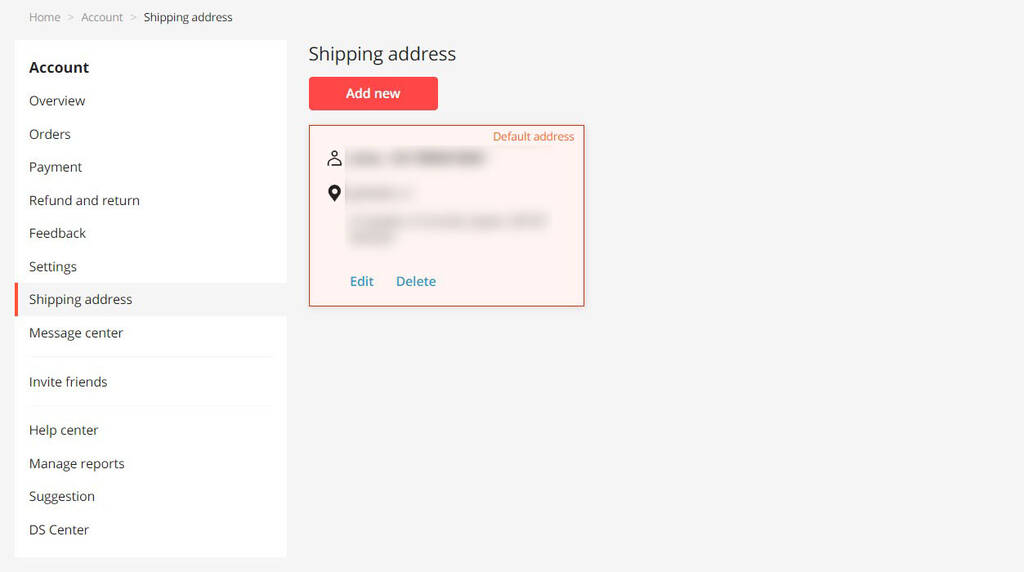
3. Click on the “Add new”;
4. Decide which address you want to add. Select the country and region / province / region; specify the city, street, house, apartment and zip code. And also enter the recipient’s data: recipient’s full name and phone number. Be careful when specifying the correct information, because AliExpress and the seller may not check whether your address is correct before shipping. Only you are responsible for it.
Specify a valid phone number correctly, because it is necessary for communication with courier, customs services and post offices. Without it, you will not be able to receive notifications about the arrival of the parcel, as well as to solve possible issues related to delivery and processing of the order. The courier may need to clarify delivery address, and the post office and customs may need to contact you to confirm information or if duties need to be paid. Use a phone number that the courier or postal service can actually reach;
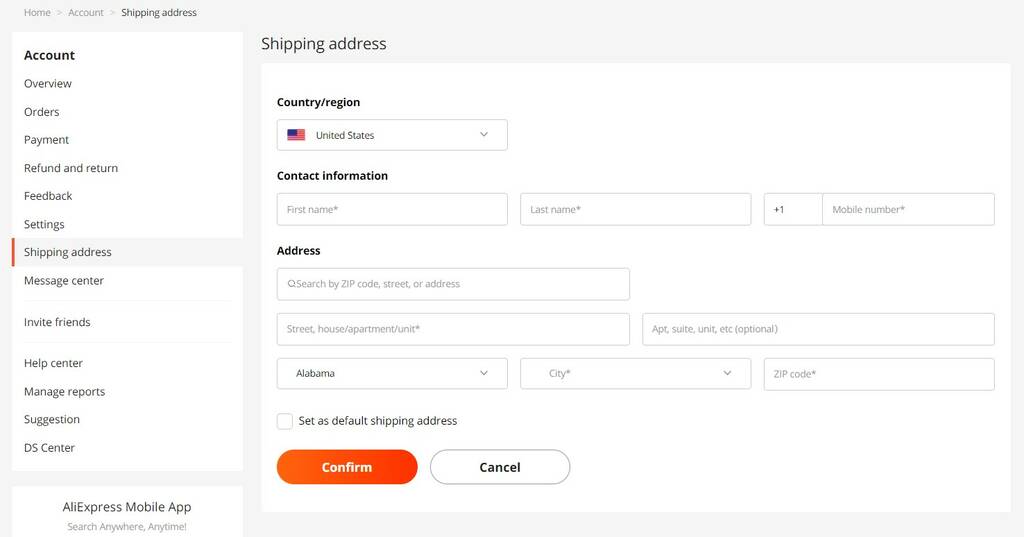
5. Click on the “Confirm”.
Make sure the address is complete and written in a format that your local postal service can understand. AliExpress, the seller and the carrier may not check whether your address is correct before shipping. Now you know how to fill in your address on Aliexpress.
How to fill in your AliExpress shipping address correctly
Before saving an address, check every field carefully.
| Field | What to enter |
|---|---|
| Full name | Recipient’s first and last name as used by local postal services |
| Country/Region | The country where the parcel should be delivered |
| State/Province/Region | Required in many countries |
| City | City or town name |
| Street address | Street name and house/building number |
| Apartment/Unit | Apartment, flat, unit, floor or building details |
| ZIP/Postal code | Correct postal code for the delivery area |
| Phone number | Valid phone number with country code |
The postal code and phone number are especially important. A wrong postal code can send the parcel to the wrong sorting area, and an invalid phone number may prevent the courier or post office from contacting you.
How to change the address
How to edit or delete a saved shipping address
To edit a saved address:
- Log in to AliExpress.
- Open your account profile.
- Go to “Shipping Address”.
- Find the address you want to change.
- Click “Edit”.
- Update the necessary fields.
- Check the full address again.
- Click “Confirm”.
To delete an old address:
- Open “Shipping Address”.
- Find the address you no longer use.
- Click “Delete”.
- Confirm deletion.
If you often ship to different places, keep only current and correct addresses. This reduces the risk of choosing the wrong address at checkout. Now you know how to change shipping address on Aliexpress.
How to specify or change shipping address on Aliexpress in the mobile app
The process of adding or changing an address in the mobile app is similar to these processes on the website.
What to do if the address is wrong after payment
If you notice the wrong address after paying, act immediately. The seller may still be able to update the address if the order has not been shipped yet.
Steps:
- Open “My Orders”.
- Check the order status.
- If the order is still awaiting shipment, message the seller immediately.
- Send the correct address in a clear format.
- Ask the seller to confirm whether they can update it before shipment.
- If the seller cannot change the address, request order cancellation.
- Place a new order with the correct address only after cancellation or refund is clear.
Do not rely only on a message if the seller does not confirm the change. If the address is important and the order has not shipped yet, cancellation and reordering may be safer.
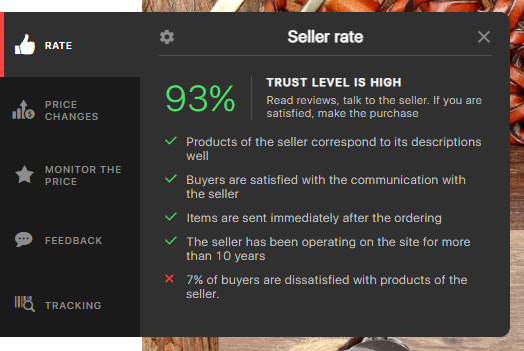
In this case, it is extremely important to buy from a seller who responds quickly to messages. The free browser extension AliHelper will help you find such a seller. The speed of feedback is one of the criteria for checking the seller of Aliexpress for reliability, which shows this plugin. It will also help you track your parcel, show the price change graph, find similar products, etc.
Can you change the shipping address after the package has shipped?
Usually, you cannot change the shipping address through AliExpress after the seller has shipped the package. At this stage, the parcel is already in the logistics system.
What you can try:
- Track the parcel regularly.
- Wait until it reaches your country or local delivery company.
- Contact the local carrier or postal service.
- Ask whether parcel redirection, address correction or pickup at a post office is available.
- Provide tracking number, recipient name, phone number and proof of identity if required.
- Be ready to pay a redirection fee if the service is available.
Not every carrier allows address changes after shipment. If the address is seriously wrong, the parcel may be returned to the seller or delivered according to the original label.
How serious is the address mistake?
| Mistake | Risk level | What to do |
|---|---|---|
| Wrong apartment/unit number | Medium | Contact seller before shipment or local carrier later |
| Missing building/floor details | Medium | Add details if order has not shipped |
| Wrong postal code | High | Correct immediately; parcel may go to wrong sorting area |
| Wrong city | High | Contact seller or cancel before shipment |
| Wrong country | Very high | Cancel before shipment if possible |
| Wrong phone number | Medium to high | Update before shipment; courier may not reach you |
| Typo in name | Low to medium | Depends on local delivery rules |
| Old address | High | Cancel or contact seller before shipment |
The more serious the mistake, the faster you should act. If the country, city or postal code is wrong, cancellation before shipment may be safer than trying to fix the parcel later.
What if the parcel was delivered to the wrong address?
If tracking says “Delivered” but you did not receive the package, first check whether the address in the order was correct.
Then:
- Check the full tracking details.
- Contact the local carrier or post office.
- Ask who received the parcel and where it was delivered.
- Save screenshots of the order address and tracking status.
- Contact the seller through AliExpress.
- If the parcel was delivered to a different city or wrong address, prepare evidence for a dispute.
- Do not confirm receipt if you have not received the package.
If the wrong address was entered by you, the dispute may be harder to win. If the seller shipped to an address different from the one in the order, your case is stronger.
Can AliExpress support change my shipping address?
AliExpress support usually cannot change the shipping address after the seller has already shipped the order. Before shipment, the seller is usually the most important contact because they prepare the parcel label.
Contact AliExpress support if:
- the seller ignores your messages;
- the seller shipped to an address different from your order;
- the order cannot be cancelled;
- the parcel was delivered to the wrong city;
- you need help with a dispute or refund;
- the address issue was caused by a platform error.
For simple address corrections before shipment, contact the seller first.
Please note that the parcel redirection service is chargeable even if free shipping was originally selected on AliExpress. The cost of this service may vary depending on the company and the redirection distance. Therefore, it is important to enter the correct address on AliExpress right away.
Changing your shipping address on AliExpress is an important procedure that can help you avoid problems with receiving your items. By following these steps, you can successfully change your shipping address and receive your purchases on time. Always verify the information before confirming your order and don’t hesitate to contact the seller if necessary. Now you know how to change shipping address on Aliexpress.


Yes, you can change a saved shipping address in your AliExpress account before placing an order. If the order has already been paid for, changing the address depends on whether the seller has shipped the parcel.
Open your AliExpress account, go to “Shipping Address”, choose the saved address and click “Edit”. Update the details and save the changes before placing a new order.
Sometimes. If the order is still awaiting shipment, contact the seller immediately and send the correct address. The seller may be able to update it before shipping. If not, ask them to approve cancellation so you can reorder.
Usually, no. Once the parcel has shipped, AliExpress usually cannot change the delivery address. You may need to contact the local carrier when the parcel reaches your country and ask whether redirection is available.
Contact the seller immediately if the order has not shipped. A wrong postal code can send the parcel to the wrong sorting center. If the parcel has already shipped, contact the local carrier as soon as tracking shows movement in your country.
Address Line 2 is for extra delivery details such as apartment number, unit, floor, building name, company name, district or landmark.
The seller may be able to update the shipping address before shipment, but this is not guaranteed. Always wait for confirmation. If the seller cannot change it, cancellation and reordering may be safer.
If the order has not shipped and the mistake is serious, such as wrong country, city or postal code, cancellation and reordering with the correct address may be safer.
Check whether the address in the order was correct. Then contact the local carrier, save tracking screenshots and contact the seller. If the parcel was delivered to the wrong city or address, prepare evidence for a dispute.






How address detail 2* i can not enter in japan can you help me…