
 Install for free
How to delete Aliexpress account in 2026


Deleting a profile on Aliexpress is a process whereby a user permanently removes their profile and all associated data from the platform. If you delete your account, it will be easy to sign up again.
Recovering a deleted account through support may take months and is not guaranteed. In this article you will find detailed instructions on how to delete an Aliexpress account in 2026, as well as learn what consequences this will lead to and whether there are alternatives.
Before you delete your AliExpress account (quick checklist)
- Make sure all active orders are completed (or disputes are resolved).
- Save anything you may need later: order details, receipts/screenshots, and links to favorite products/stores.
- Remove saved payment methods if privacy is your main concern.
- Consider alternatives first (log out, disable emails/notifications) if you only want fewer messages.
How to delete an Aliexpress account on the website
1. Go to aliexpress.com. This is the current version of the platform for buyers from all countries except CIS and Georgia;
2. In your account settings, open the “Settings” section;
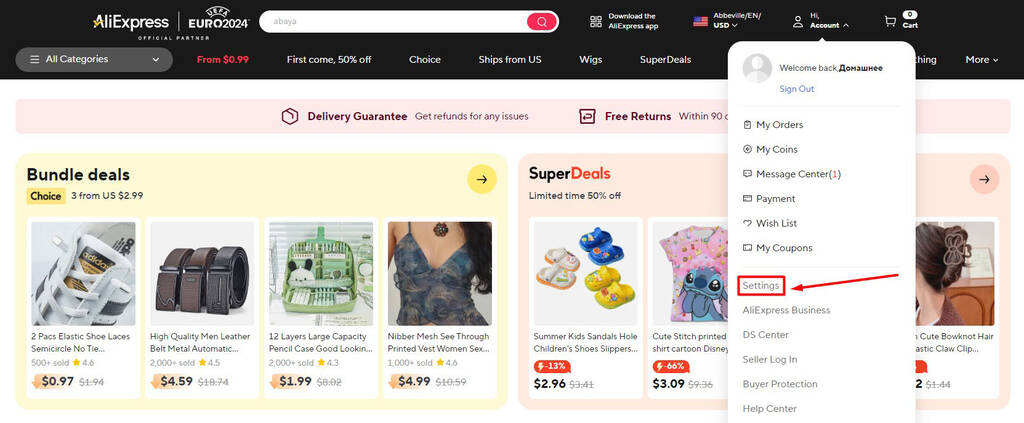
3. Click on “Edit profile” in the “Personal Information” subsection;
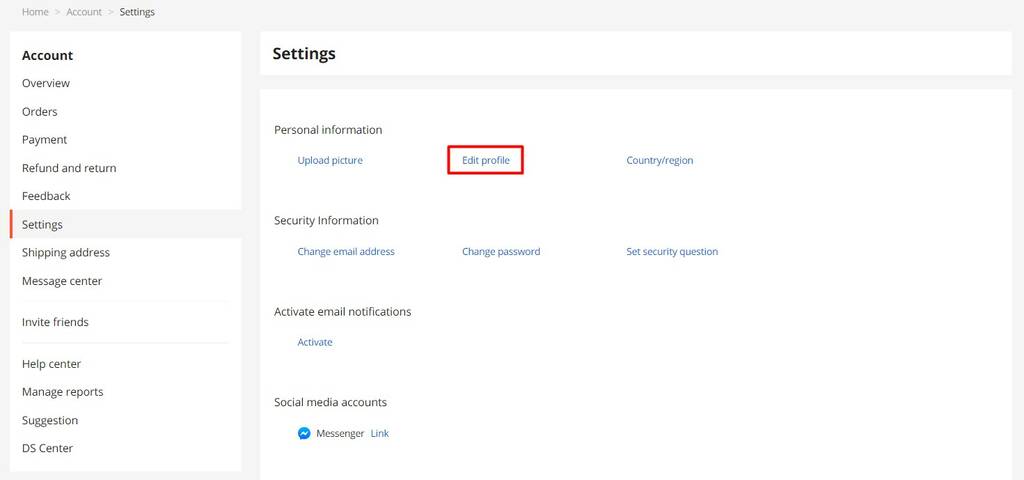
4. Next, click on the “Deactivate Account” link;
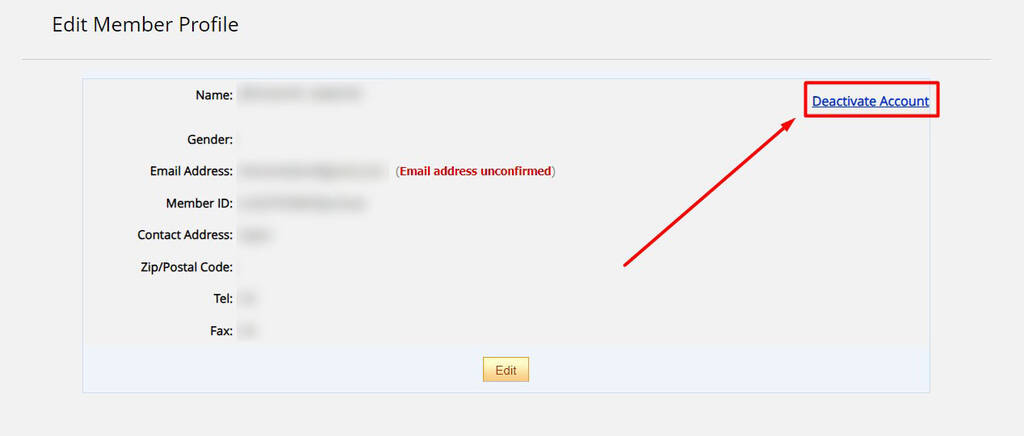
5. Click on the “Delete Your Account” button;
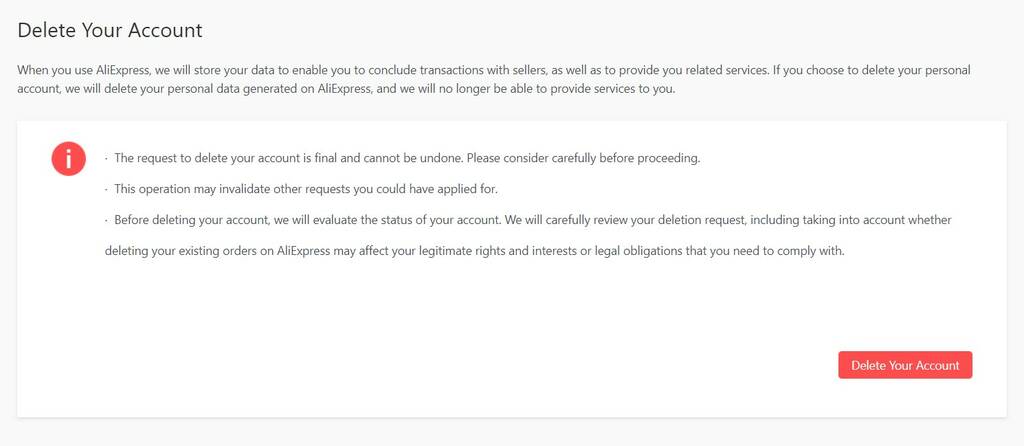
6. Type “agree” into the form and click on the Delete button;
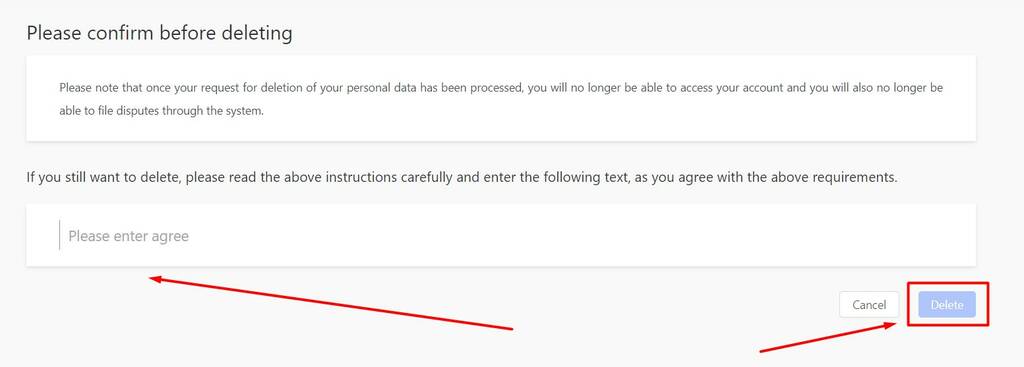
7. In the pop-up window, click on “Get Code” and navigate to your email inbox associated with your AliExpress profile. Look for an email titled “Your AliExpress Verification Code” and copy the provided code. Return to the verification pop-up and paste the code into the designated field, then click on “Verify.” Finally, click “Delete Account” to permanently remove your AliExpress account.
How to delete an account in the mobile app
Deleting a personal profile in the phone app is completely similar to the process of deleting a profile on the AliExpress website.
Deleting your account in the AliExpress app is similar to the website flow:
1) Go to Account → Settings
2) Open Profile / Personal Information
3) Choose Deactivate/Delete account and complete the verification step
How to delete a blocked personal profile
In many cases, blocked accounts cannot be deleted through the standard self-service flow. If your profile is blocked, check the Help Center to see what options are available for your specific case.
Reasons for deleting a personal profile
Deleting an account on Aliexpress may be useful in the following cases:
Concerns about the preservation of personal data
If a user is worried about the privacy of their data or fears that their data may be misused, they may decide to delete the profile.
Entering a profile by mistake or for purposes unrelated to shopping
If a user has registered on Aliexpress by mistake or for purposes other than ordering, they are more likely to decide to delete their profile.
Receiving a lot of spam and alerts
Usually people are not happy when they receive a large number of irrelevant emails and alerts. This can lead to impulsive deactivation of the personal account.
Stop using the platform
A buyer who no longer plans to use Aliexpress for shopping can delete the account to avoid receiving promotional emails and notifications.
Lack of desired products
Also the user can say goodbye to the Chinese platform, if the products they need are no longer available, or the price/quality no longer meets their expectations. Or their price and quality will no longer satisfy him.
Loss of access to mail
If the buyer loses access to the mail, on which the account was registered, the logical step would be to delete it to avoid data leakage.
Problems with the account
In case of serious account problems, such as hacking or unauthorized access, the user may prefer to delete the account to protect their personal data.
Negative experience
If the buyer encountered rudeness of the seller or fraud, remained dissatisfied with the order or communication with the administration of the platform, there may be a desire to stop placing orders on Aliexpress.
Consequences of account deletion
Since restoring a deleted AliExpress account is rarely successful and may take months, it is worth familiarizing yourself with the consequences of account deactivation:
1. You will lose your order history. If you suddenly want to open a dispute, leave feedback on the purchase, see exactly what, from whom and how much you ordered, you will not be able to do it;
2. All accumulated bonuses will be reset. Aliexpress has a loyalty system that allows users to accumulate points and purchase goods more favorably. When the account is deactivated, the points are burned off and the achieved level is reset to zero;
3. You will lose gift coupons. With frequent or large orders, as well as on some sales, sellers give individual coupons and promo codes. They are also tied to the account and disappear when deleted;
4. Correspondence with sellers and platform administration will be cleared.
Deactivate vs Delete (what’s the difference?)
- Deactivate usually means you’re starting the account removal flow.
- Delete account is the final, permanent step. Once deleted, your account data and history may not be recoverable.
Alternatives to deactivating an Aliexpress account
Deleting the mobile application
If for some reason you do not want to use the AliExpress platform exactly from your phone, you can easily delete the application. To do this, just find it on the screen of your smartphone, press and hold the application icon until the menu appears. Then select the “Uninstall” option. After that, the app will be completely removed from your device. And you will no longer receive notifications and messages from AliExpress on your phone;
Disable notifications and emails
If you are tired of numerous unnecessary notifications and emails from AliExpress, you can easily disable them in your personal cabinet on the website or in the app. To do this, go to the notification settings and uncheck the notification types you don’t need. You can also unsubscribe from newsletters directly in your inbox using the unsubscribe links that are usually found at the bottom of each email. This will ensure that you only receive the information that really matters;
Signing out of your Aliexpress account
If you, let’s say, need to hide your presence on the platform, you can log out of your account in your personal account settings. After that, your account will be deactivated on your device. And you will need to enter your login and password the next time you log in. In addition, it is recommended to clear your browser history and delete saved passwords. If you want more privacy, you can also clear saved passwords and browsing data on your device.
Deleting card data
If you are worried about the privacy of your payment information, do not save your card details when making a payment. And if you have already saved it, you can easily delete it. This will keep your financial information safe and prevent its possible misuse. Read: How to remove card from Aliexpress.
Contacting other stores on the platform
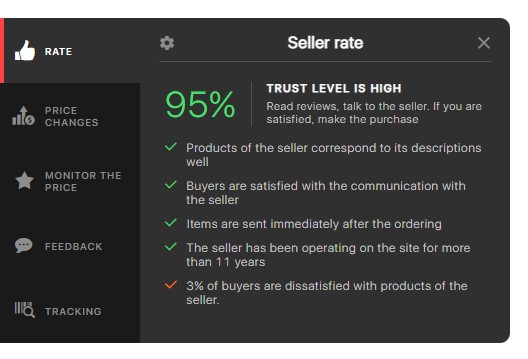
Aliexpress is a marketplace, i.e. a platform where thousands of individual organizations provide goods. If you encounter rudeness or fraud from a particular seller, try contacting another. There are a lot more decent stores on the platform. And finding a reliable seller on Aliexpress will help AliHelper. It will show a detailed rating of each store according to five criteria.
Additional security measures
In addition to the above measures, you may want to consider other ways to protect your information on AliExpress. For example, change your passwords periodically and use two-factor authentication to increase security. Also, keep an eye out for suspicious activity on your account and respond promptly to any notifications of suspicious activity.
Conclusion
The process of deleting a personal profile on AliExpress is quite simple, but it leads to irreversible consequences. Before deciding to deactivate your account, it’s important to weigh the pros and cons. You may be able to find an alternative solution to avoid account deletion. For example, you can simply turn off notifications or temporarily suspend your use of the platform.
If you do decide to delete your account, be sure to keep the links to your favorite products and stores. So that you can easily find them again if needed. This is especially important if you have favorite products or stores that you return to often.
Now you know how to delete your AliExpress account permanently both on your computer and through the mobile app in 2026. The process involves a few simple steps that will help you permanently deactivate your profile. Don’t forget that once your account is deleted, all your data, purchase history and saved items will be lost forever and it will be impossible to recover them.