 Install for free
How to Find Similar Products on AliExpress and Choose the Best Deal


AliExpress often has the same or very similar product listed by several different sellers. The price, shipping cost, delivery time, reviews, product options and seller reliability may vary a lot — even when the photos look almost identical.
That is why searching for similar products is one of the easiest ways to avoid overpaying. Instead of buying the first item you see, you can compare several listings, check real customer photos, review seller ratings and choose the offer that gives you the best balance of price, quality and delivery.
In this guide, you will learn where to find similar products on AliExpress, how to compare alternatives and how AliHelper can make this process faster.
Quick answer:
To find similar products on AliExpress, open the product page and check recommendation blocks such as “Similar items”, “You may also like” or related product carousels. You can also search manually by keywords, use image search, check the mobile app recommendations or use AliHelper to compare similar listings, seller ratings and price history. Before buying, compare the final price with shipping, reviews with photos, product options, delivery time and seller reliability.
Might be of interest: Sites similar to AliExpress.
What are similar products on Aliexpress
Similar products are listings that look, function or perform like the item you are currently viewing. They may be the same product from another seller, a different version of the same item or an alternative with similar features.
On AliExpress, similar products may include:
- the same item sold by another seller;
- the same product in a different color, size or configuration;
- a similar model from another brand;
- a cheaper alternative with comparable features;
- a product with better reviews, faster delivery or a lower shipping cost.
The goal is not just to find something that looks similar. The goal is to compare listings and choose the best combination of price, seller reliability, reviews and delivery.
Real example: A user searching for wireless earbuds priced at $45 found an identical model (same photos, specifications) from another seller at $28 with free shipping – a 38% saving. This happens because AliExpress allows multiple sellers to source from the same manufacturers, creating price competition that benefits buyers.
Why you should compare similar products before buying
Similar product are not just “something similar”, they are a way to save money and get a better deal. Here are the main reasons why you should use this feature:
- Price range. A similar product may be cheaper when sold by another seller. Average savings vary by category: electronics (15-25%), fashion accessories (30-50%), home goods (20-40%). According to AliExpress 2024 Buyer Insights Report, products with 3+ seller alternatives show 32% lower average prices than exclusive listings.
- Free or cheaper shipping. One seller offers things with paid shipping, and another – with free shipping. This is especially true for purchases under $5-10.
- Discounts and coupons. There may be no coupons in the product card, while a similar item may have an active promo code, promotion or seller’s internal discount.
- More reviews. Some alternatives have more reviews, which helps to assess the real quality of the thing before buying. Research by Spiegel Research Center shows that products with 100+ reviews have 15% higher perceived trustworthiness. Look for reviews with customer photos (3x more reliable than text-only) and detailed descriptions of packaging, sizing, and material quality.
- Brand choice. An analogue can be from another brand with a better reputation or an official shop on the platform. Sometimes this gives additional guarantee and support.
Where to look for similar items on AliExpress
Here are some ways to help you find similar items manually or using the inbuilt tools:
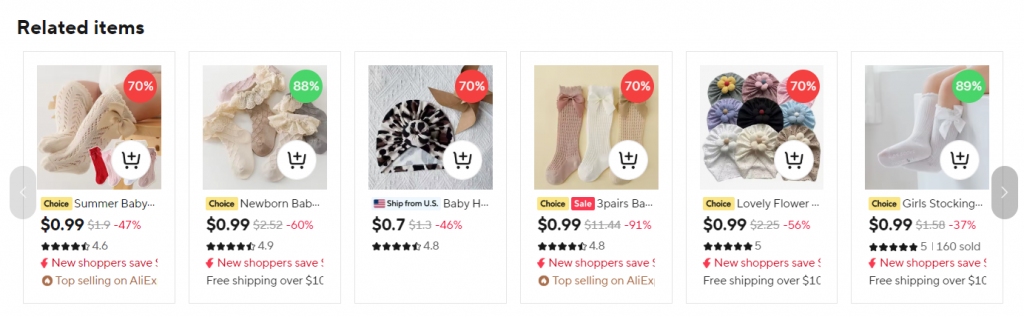
1. Use built-in recommendation blocks on AliExpress. They appear either in the “You may also be interested” section or at the bottom of the page under the product card. Sometimes they appear in a carousel or grid format with thumbnails and prices, depending on the current design of the platform’s interface.
Note that similar items are not always sorted by price – AliExpress’s algorithm prioritizes ‘Best Match’ based on relevance score (40%), seller rating (30%), order volume (20%), and price (10%). A $15 item with 4.8 stars and 5,000 orders may rank higher than an $8 item with 4.2 stars and 50 orders. Use the ‘Price’ filter to sort strictly by cost.
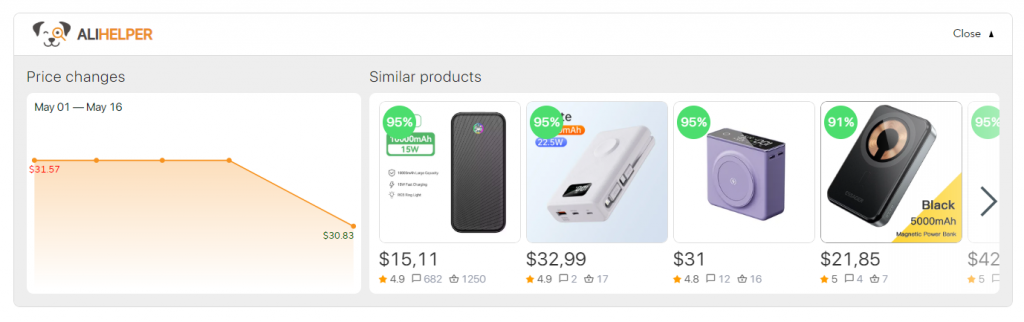
2. Also, the “Similar products” function is found in various free browser extensions embedded in the site. For example, AliHelper (4.7★ rating, 500,000+ users on Chrome Web Store) displays similar products under the product card, right next to the interactive “Price change on AliExpress“ graph. Each alternative shows color-coded seller ratings (green >4.5★, yellow 4.0-4.5★, red <4.0★), allowing you to instantly compare both pricing history and seller reliability in one view. This dual-data approach helps you spot genuine deals vs. inflated ‘discounts’ and avoid low-rated sellers. Install from official browser stores to ensure security.
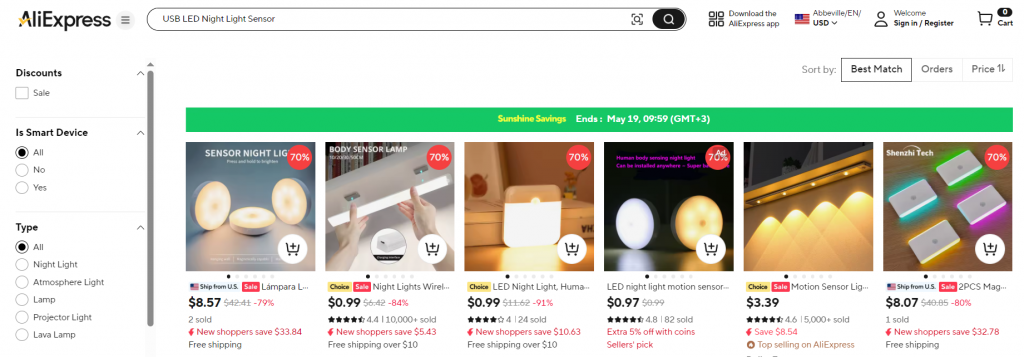
3. You can search for similar items on AliExpress manually by keywords.
Pro technique: Start broad (“USB LED Night Light”), then refine by adding specifications (“+ motion sensor + rechargeable + warm light”). Use quotation marks for exact phrases (“magnetic charging cable”) to filter out irrelevant results. Combine with filters: Free Shipping + Orders (1000+) + Rating (4★+) to narrow down to proven sellers. This method often reveals 20-30% more alternatives than the built-in suggestion blocks.
Where to find similar products in the AliExpress mobile app
The AliExpress mobile app may also show a “Similar Products” block in the card of the item you have selected. Searching by the name of the item of interest also works.
May be interesting: How to search on AliExpress by photo.
What to consider when choosing an analogue product on AliExpress
Price is not always the main criterion. Before buying a similar product, compare:
- Reviews and seller rating. Read comments carefully, especially those that contain real photos. Pay attention to the presence of negative feedback – they often give a more accurate idea of the real quality. The rating of the shop itself also plays an important role: if it is low, there is reason to think. Red flags for fake reviews: Generic praise without specifics (“Great product!”), multiple reviews posted on the same date, identical phrasing across accounts, or stock photos instead of real customer images. According to a 2023 e-commerce study by ReviewMeta, 15-30% of AliExpress reviews show manipulation indicators. Prioritize verified purchase reviews (marked with a badge) and those including parcel photos, dimension comparisons, or usage videos.
- Number of orders. This is not just a figure – it shows how actively people choose this particular option. Recommended thresholds: For electronics/gadgets, look for 500+ orders; for accessories/clothing, 1,000+ orders; for new product launches, 100+ orders within 30 days signals strong demand. However, high order volume doesn’t guarantee quality – cross-reference with recent reviews (last 3 months) to ensure consistent performance. A sudden drop in ratings despite high total orders may indicate quality decline.
- Details in the description and photos. Do not limit yourself to the first image and general characteristics. Scroll to the end, read all the specifications, clarify the dimensions, materials, equipment. This is especially important when ordering technical devices or items with a non-standard shape.
- Terms of return and warranty. Make sure that the chosen seller provides reasonable conditions for returns in case of malfunctions or discrepancies. The availability of an official warranty or brand endorsement can also be a deciding factor.
- Delivery methods and timing. Pay attention not only to the price of delivery, but also to its speed, traceability, and which logistics company the seller works with. Comparison of popular methods:
| Method | Typical Timeframe | Tracking | Best For |
| AliExpress Standard | 15-30 days | Full | Balanced cost/speed |
| ePacket (US/UK) | 10-20 days | Full | Light items <2kg |
| Cainiao Super Economy | 20-40 days | Limited | Budget purchases |
| DHL/FedEx Express | 3-7 days | Full | Urgent orders |
Sometimes a more expensive similar item is more reliable, and trying to save money can result in long delivery times, poor quality or lack of support.
Same product or just similar: how to check
Two AliExpress listings can use very similar photos but still sell different products. Before buying, check whether the items are really the same.
Compare:
| What to check | Why it matters |
|---|---|
| Product options | Color, size, plug type, model or bundle may differ |
| Specifications | Similar-looking products may have different power, material or dimensions |
| Customer photos | They show what buyers actually received |
| Package contents | Some listings show a full set but sell only one item |
| Seller rating | The same product may be sold by more or less reliable sellers |
| Shipping cost | A cheaper item may become more expensive after delivery fees |
| Recent reviews | Old reviews may not reflect current product quality |
| Price history | A discount may be less attractive if the price was raised before the sale |
Similar products on AliExpress are a powerful tool for informed and frugal shopping. By following this 5-step verification checklist, you can maximize savings while minimizing risks:
- Compare 3-5 sellers for the same/similar item
- Check seller rating (aim for 95%+ positive feedback)
- Read recent reviews (last 30-90 days) with customer photos
- Verify shipping (local warehouse > standard > economy)
- Use tools like AliHelper for automated price tracking and seller scoring
According to our user data, shoppers who compare similar products save an average of $12-18 per order and report 40% fewer disputes. Start with one purchase using these techniques, and you’ll quickly develop an eye for the best deals. Install AliHelper extension to automate comparisons and never miss a better alternative again.


Open a product page and check recommendation sections such as “Similar items” or “You may also like”. You can also search manually by keywords, use image search or use AliHelper to compare similar listings from different sellers.
No. Similar products may look almost identical in photos but differ in size, material, model, configuration, quality or package contents. Always compare specifications, customer photos and product options before buying.
Open several similar listings, compare the final price with shipping, check seller rating, read recent reviews and look at the product options. A lower product price is not always a better deal if shipping is expensive or the seller has poor feedback.
Yes. You can use image search in the AliExpress app or tools such as Google Lens. Upload a product photo or screenshot, then compare the results manually.
Check the final price, shipping cost, delivery time, seller rating, recent reviews with photos, product specifications, package contents and return conditions.
Many sellers may source products from the same manufacturer or use similar supplier photos. This does not always mean the product quality, shipping speed or seller service will be the same.
No. The cheapest listing may have slower delivery, fewer reviews, weaker seller rating, different product options or expensive shipping. Choose the best overall offer, not just the lowest product price.
AliHelper can help you compare similar AliExpress products, seller ratings, price history and other shopping signals. It is useful when several listings look almost identical and you want to choose a safer and more profitable option.