
 Install for free
How to Track an AliExpress Order: Tracking Number, Delivery Statuses and Common Problems


Ordered something on AliExpress and want to know where your package is? Tracking helps you follow the parcel from the seller’s warehouse to your address, understand delivery delays and collect evidence if something goes wrong.
In this guide, you will learn how to find your AliExpress tracking number, where to check your delivery status, what the most common tracking updates mean and what to do if your package is stuck, returned, marked as delivered or not updating. We will also show how AliHelper can make tracking multiple AliExpress orders easier.
Quick answer: how to track an AliExpress order
To track an AliExpress order, open My Orders, choose the order and click Track Order or open the logistics section. There you will see the current delivery status and, if the seller has shipped the package, the tracking number.
You can check the parcel status:
- inside AliExpress;
- in the AliExpress mobile app;
- on the carrier’s official website;
- on Cainiao tracking;
- in a tracking tool such as AliHelper.
If the tracking number does not work immediately, wait 24–72 hours after shipment. Sometimes the seller creates a shipping label before the carrier scans the parcel. If tracking has not updated for a long time, the package is marked as “Delivered” but you have not received it, or Buyer Protection is about to expire, contact the seller and prepare evidence for a dispute.
Order number vs tracking number: what is the difference?
Many buyers confuse the AliExpress order number with the tracking number. They are not the same.
| Type of number | What it is used for | Where to find it |
|---|---|---|
| Order number | Identifies your purchase inside AliExpress | In “My Orders” |
| Tracking number | Shows the movement of the parcel through carriers | In the logistics or tracking section after shipment |
| Order status | Shows whether the order is paid, shipped, completed or refunded | In your AliExpress account |
| Delivery status | Shows where the package is in the shipping process | In tracking details |
The order number is useful when you contact the seller or AliExpress support. The tracking number is what you need to check where the package is.
Where to find the AliExpress tracking number
You can find the tracking number after the seller ships the order.
On the AliExpress website
- Log in to your AliExpress account.
- Open My Orders.
- Find the order you want to check.
- Click Track Order or open order details.
- Look for the tracking number and delivery updates.
In the AliExpress mobile app
- Open the AliExpress app.
- Go to Account or My Orders.
- Select the order.
- Tap the tracking or logistics section.
- Check the current status and tracking number.
If there is no tracking number yet, the seller may still be preparing the shipment. Check the processing time and wait for the order to be shipped.
Can you track an AliExpress order without a tracking number?
Not fully.
Without a tracking number, you can only see the order status inside AliExpress, such as Processing, Shipped or Awaiting delivery. Detailed parcel movement becomes available only after the carrier receives and scans the package.
If the seller has not shipped the order yet, you can:
- wait until the processing time ends;
- message the seller and ask when the parcel will be shipped;
- cancel the order if cancellation is still available;
- monitor the order status in your account.
Where to track an AliExpress package
There are several ways to track an AliExpress parcel. The best option depends on the stage of delivery.
| Tracking method | Best for | Limitation |
| AliExpress tracking | Quick order status check | Updates may be delayed |
| AliExpress mobile app | Checking orders on the phone | Not always detailed |
| Cainiao tracking | Many AliExpress and Cainiao-related shipments | Some local updates may appear later |
| Carrier website | Final delivery stage in your country | You need to know the local carrier |
| AliHelper | Monitoring multiple AliExpress orders in one place | Critical issues should still be checked with the carrier |
For everyday tracking, AliExpress or AliHelper is usually enough. For serious delivery problems, such as “Delivered” but not received, wrong city or returned parcel, always cross-check the tracking number on the local carrier’s website.
How AliHelper helps track AliExpress orders
AliHelper is a shopping assistant for AliExpress users. It can help you monitor several orders in one place instead of opening every order manually.
This is especially useful during sales, when you may have multiple parcels from different sellers and carriers. You can use AliHelper as a convenient tracking dashboard and check your orders faster.
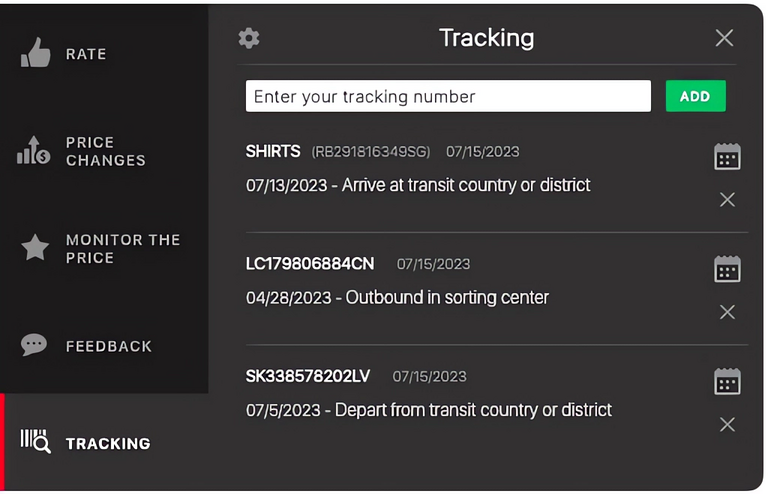
AliHelper can help you:
- save and monitor tracking numbers;
- keep multiple AliExpress orders in one place;
- check recent parcel updates;
- avoid confusing several similar orders;
- return to order details faster;
- combine tracking with other shopping checks, such as seller rating, price history and similar products.
AliHelper does not replace AliExpress support or the carrier. If there is a serious delivery issue, use AliHelper for convenience, but also check the tracking number on the carrier’s official website and save screenshots.
Common AliExpress tracking statuses and what they mean
AliExpress tracking statuses may be worded differently depending on the shipping method, carrier and destination country. Still, most updates fall into several common groups.
| Status | What it usually means | What to do |
| Order placed | You created the order | Wait for payment and processing |
| Processing | The seller is preparing the order | Wait or contact the seller if it takes too long |
| Shipped | The seller has sent the package | Wait for the first carrier scan |
| Accepted by carrier | The carrier received the parcel | Track normally |
| Departed from origin country | The package left the seller’s country | Wait for international transit |
| Arrived at transit country/region | The parcel is passing through another country or logistics hub | Wait for the next update |
| Arrived at destination country | The package entered your country | Check local carrier tracking |
| Customs clearance | The parcel is being checked by customs | Wait or respond to official requests if needed |
| Out for delivery | The parcel is with the courier or local delivery office | Be ready to receive it |
| Delivered | The system says the parcel was delivered | If you did not receive it, act quickly |
| Returned to sender | The parcel is going back | Contact the seller and consider a dispute |
| Exception | There is a delivery issue | Check details and contact the carrier or seller |
Why AliExpress tracking does not update
Tracking may stop updating for several reasons. Not every pause means the package is lost.
Common reasons include:
- the tracking number was created but not scanned yet;
- the parcel is waiting for pickup by the carrier;
- the package is in international transit;
- the parcel is passing through customs;
- the local carrier has not scanned it yet;
- the shipping method has limited tracking;
- there are holidays, high-volume sales or logistics delays;
- the carrier changed the tracking number after the parcel entered your country.
A short pause is usually normal. A long pause becomes a problem when the estimated delivery date has passed or Buyer Protection is close to expiring.
When no tracking updates are normal
| Situation | Is it normal? | What to do |
| Tracking number was issued today | Yes | Wait 24–72 hours |
| No updates for 2–5 days after shipment | Often normal | Check again later |
| Parcel is in international transit | Often normal | Wait and monitor protection time |
| Parcel is at customs | Usually normal | Check for customs messages |
| No updates after arrival in your country | Sometimes normal | Check local carrier tracking |
| Buyer Protection is almost over | Risky | Contact seller and prepare a dispute |
What to do if the tracking number is invalid
If the tracking number does not work, do not panic immediately.
First:
- Check that you copied the number correctly.
- Remove extra spaces.
- Wait 24–72 hours after shipment.
- Try AliExpress tracking, Cainiao and the carrier website.
- Ask the seller which carrier is handling the parcel.
If the number still does not work after several days and the seller gives no clear answer, save screenshots and monitor Buyer Protection.
What to do if tracking says “Delivered” but you did not receive the package
This is one of the most stressful AliExpress delivery problems. Do not confirm receipt if you have not actually received the parcel.
First, check:
- your mailbox;
- front door;
- parcel locker;
- building reception;
- concierge;
- package room;
- neighbors;
- family members or housemates;
- local post office or pickup point.
Then open the carrier’s website and look for delivery details. Some carriers may show a delivery photo, signature, pickup point or delivery location.
If the parcel still cannot be found:
- Contact the local carrier.
- Ask where the package was delivered.
- Save screenshots of the tracking page.
- Save any carrier response.
- Write to the seller through AliExpress.
- Open a dispute if the package was not delivered to your address.
Message to the seller
Hello. The tracking status says “Delivered”, but I have not received the parcel. I checked my mailbox, delivery location and local carrier information. Please provide delivery confirmation or help me solve this issue. If the parcel cannot be found, I will open a dispute.
Dispute text example
The tracking shows “Delivered”, but I did not receive the parcel. The delivery address in my order is correct. I checked with the local delivery service and the package was not delivered to me. I request a refund.
What to do if the package is going to the wrong city or country
If tracking shows a different city, region or country, the seller may have given you the wrong tracking number, or the carrier may have mixed up the shipment.
What to do:
- Screenshot the tracking page.
- Screenshot your order address.
- Contact the seller and ask for clarification.
- Check the number on another tracking website.
- If the mismatch is confirmed, open a dispute.
- Attach screenshots showing that the parcel is not going to your address.
Message to the seller
Hello. The tracking information shows delivery to another city/address, not mine. Please check the tracking number and provide the correct information for my order.
What to do if the parcel is returned to the seller
A returned parcel means the package is going back to the seller or warehouse. This can happen because of customs issues, wrong address, failed delivery attempt, shipping restrictions or logistics errors.
What to do:
- Check the reason for return in the tracking details.
- Contact the seller.
- Ask whether the parcel can be resent.
- Do not pay extra outside AliExpress.
- If the order cannot be delivered, open a dispute.
- Attach tracking screenshots.
If the return happened because of your incorrect address or missed pickup, the dispute may be harder. If the return happened because of the seller, carrier or logistics issue, you have a stronger case.
What to do if the package is stuck in customs
Customs delays are not always a seller problem. Packages may stay in customs because of inspections, missing information, duties, restricted items or high parcel volume.
What to do:
- check the local postal or customs website;
- check your email and SMS for customs requests;
- make sure your address and phone number are correct;
- contact the carrier if the status does not change for a long time;
- keep screenshots if Buyer Protection is close to expiring.
If customs requests information from you and you ignore it, the parcel may be returned or delayed.
When to open a dispute for delivery problems
Do not open a dispute too early if the parcel is still within normal delivery time. But do not wait until Buyer Protection expires either.
Open a dispute when:
- Buyer Protection is close to expiring and the parcel has not arrived;
- tracking says “Delivered”, but you did not receive the parcel;
- tracking shows a different country, city or address;
- the package was returned to sender;
- the seller gives no useful answer;
- the carrier confirms the parcel was lost;
- there have been no updates for a long time and the estimated delivery date has passed.
| Situation | When to act | What to prepare |
| Wrong city or country | As soon as the mismatch is clear | Tracking screenshots and order address |
| Delivered but not received | After checking with the carrier | Carrier response and tracking screenshots |
| No updates for a long time | When protection is close to expiring | Tracking page and seller messages |
| Returned to sender | When return status is confirmed | Tracking screenshots |
| Customs issue | If delay is unusually long | Carrier or customs information |
| Seller not responding | If the problem is urgent | Screenshots of messages |
Do not rely only on promises like “please wait a few more days” if Buyer Protection is almost over. Open a dispute before the protection period expires.
What evidence to prepare for a delivery dispute
For a stronger dispute, prepare clear evidence:
- tracking number screenshot;
- tracking history screenshot;
- order details screenshot;
- delivery address screenshot;
- carrier response, if available;
- screenshot showing wrong city or country;
- seller messages;
- proof that the parcel was not delivered to your address;
- screenshot of Buyer Protection or estimated delivery time.
Keep your explanation short and factual. Avoid emotional wording. AliExpress needs to understand what happened and what proof you have.
AliExpress shipping methods: what to expect
Delivery speed depends on the seller, carrier, destination country, customs workload, holidays and local delivery service. Any delivery time shown on AliExpress is an estimate, not a guarantee.
| Shipping method | Typical speed | Tracking quality | Best for |
| AliExpress Standard Shipping | about 15–30 days | usually good | regular orders |
| AliExpress Saver Shipping | about 25–45 days | limited | low-cost, non-urgent items |
| AliExpress Premium Shipping | about 7–15 days | detailed | time-sensitive orders |
| ePacket, if available | about 10–20 days | usually good | small parcels to supported destinations |
| China Post methods | about 20–40+ days | varies | budget orders |
| DHL / FedEx / UPS | about 3–7 days | detailed | urgent or higher-value orders |
The same shipping method may work differently depending on your country and the seller’s logistics partner.
How to avoid tracking problems before buying
You cannot control the entire shipping process, but you can reduce the risk.
Before ordering:
- check the seller rating;
- read recent reviews;
- look for reviews from your country;
- check whether buyers mention delivery problems;
- avoid suspiciously cheap products from new sellers;
- check the estimated delivery date;
- compare several sellers for the same item;
- choose a better shipping method for expensive or urgent orders;
- save the order details after purchase.
AliHelper can help before purchase by showing seller information, price history, similar products and other useful shopping details. This helps you choose a more reliable seller before you ever need to track the parcel.
Useful English messages for tracking problems
Tracking has not updated
Hello. The tracking number for order №____ has not been updated for __ days. Could you please check whether the parcel was handed over to the shipping company? If there is a new tracking number, please send it to me.
Tracking number is invalid
Hello. The tracking number for my order does not work on tracking websites. Please confirm the correct tracking number and carrier.
Delivered but not received
Hello. The tracking status says “Delivered”, but I have not received the parcel. Please provide delivery confirmation or help me solve this issue.
Buyer Protection is ending soon
Hello. The Buyer Protection period for order №____ is ending soon, but I have not received the parcel. Please provide an update. If there is no clear information, I will open a dispute to protect my order.
Wrong city or address
Hello. The tracking information shows delivery to another city/address, not mine. Please check the tracking number and provide the correct information for my order.
Conclusion
Tracking an AliExpress order is not just about copying a tracking number. You need to understand what the status means, when a delay is normal and when it is time to act.
Use AliExpress or AliHelper for everyday tracking. If something looks wrong, cross-check the tracking number on the carrier’s website, save screenshots and watch the Buyer Protection period. If the package is not delivered, returned, marked as delivered incorrectly or sent to the wrong address, prepare evidence and open a dispute before protection expires.








Hello. Sir !
I was bought a T-con board.(1005008332388013)
I paied by “Naver Pay”
But I can not see my order.
Please check my order.
Ali No : 1122442273563470
Naver pay NO. : 20260823NP9787501381
Thanks.