
 Install for free
How to get a discount on Aliexpress 2026


AliExpress already offers low prices, but the final checkout price can still change a lot depending on timing, coupons, and seller rules.
Below are the most reliable ways to get a discount on AliExpress in 2026 — including options that work almost every time and methods that depend on the product or the seller.
You can also get inexpensive items for free by participating in the AliHelper and AliExpress bonus program, DOGI.
Quick answer
To get the best discount on AliExpress, focus on the final checkout price, not the “–%” badge. The strongest combo is: low base price + store coupon + sale coupon + promo code, then verify the “discount” using price history. During big sales, prepare your cart in the warm-up period and compare 2–3 sellers.
Key facts
- A “–%” badge → does not guarantee → a better final price.
- Base price + stacked discounts → determines → what you actually pay.
- Coupons and promo codes → often require → a minimum cart total.
- Shipping cost → can cancel → a “big discount”.
- Warm-up period → helps you → compare and prepare before checkout.
- Price history → helps you → detect fake discounts.
How to get great discounts on AliExpress
Add an item to “Favorites”
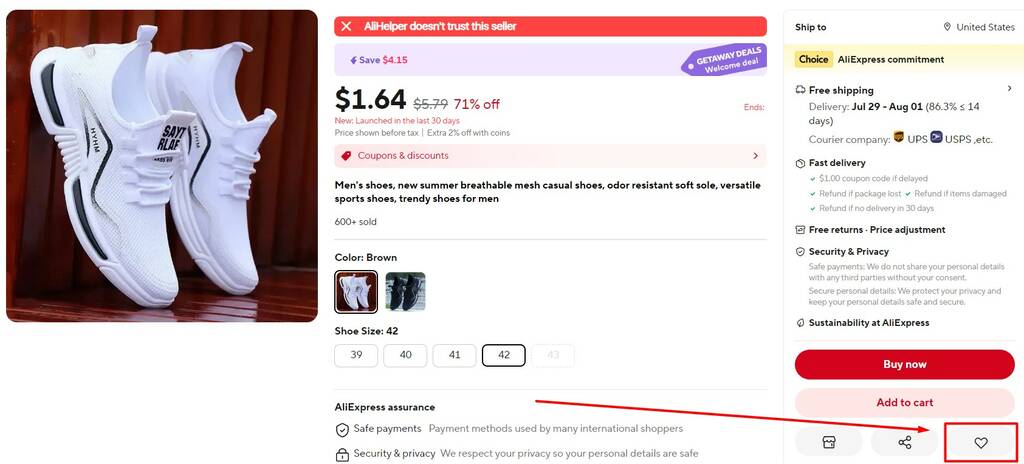
In the card of the desired item, click on the heart icon on the website or mobile app. The AliExpress seller receives alerts when their item is added to “Favorites”. Many of them contact buyers over a period of time and offer a discount.
Sales
Sales are one of the most predictable ways to pay less on AliExpress. There are promotions almost every month, and the biggest ones are usually Singles’ Day (11.11) and the AliExpress Anniversary Sale (end of March).
You can also find strong price drops during seasonal sales and Black Friday. Many big events include a short “warm-up” period, when sellers show upcoming discounts so you can add items to your cart and compare prices before checkout.
Promotions and hot items

AliExpress also has daily promo sections on the main page (usually under the search bar). They can be useful for browsing and discovering deals, but they’re less helpful when you’re searching for one specific product.
Coupons and promo codes
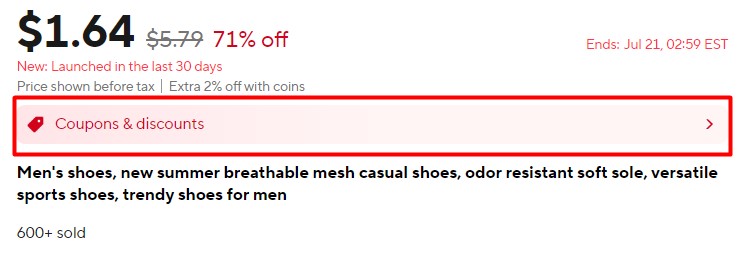
Many stores on AliExpress provide coupons. To get them, you either need to place an order in the store, or the store may offer a coupon before you order (there is always a minimum purchase amount). Some give a coupon for any order, with discounts of up to 99%. In the first case, you’ll find coupons in your account, in the “Coupons” section.
Might be of interest: How to get AliExpress promocode.
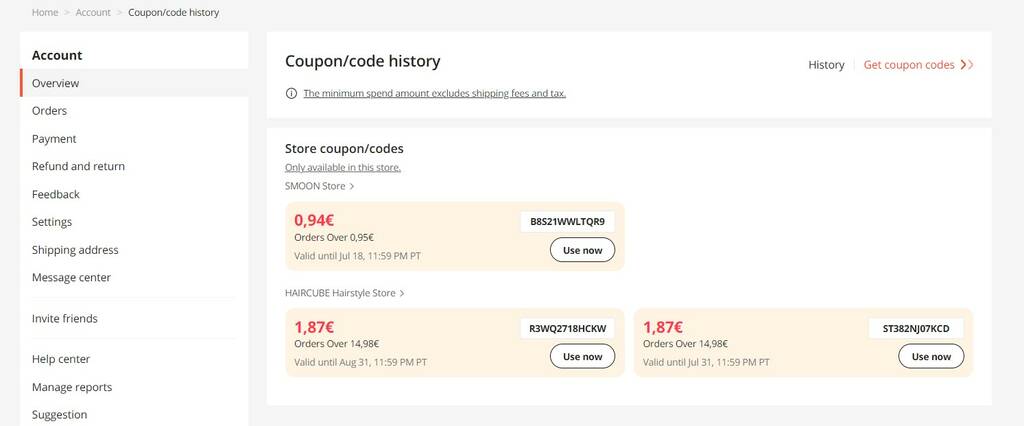
And in the second case – in the product card.
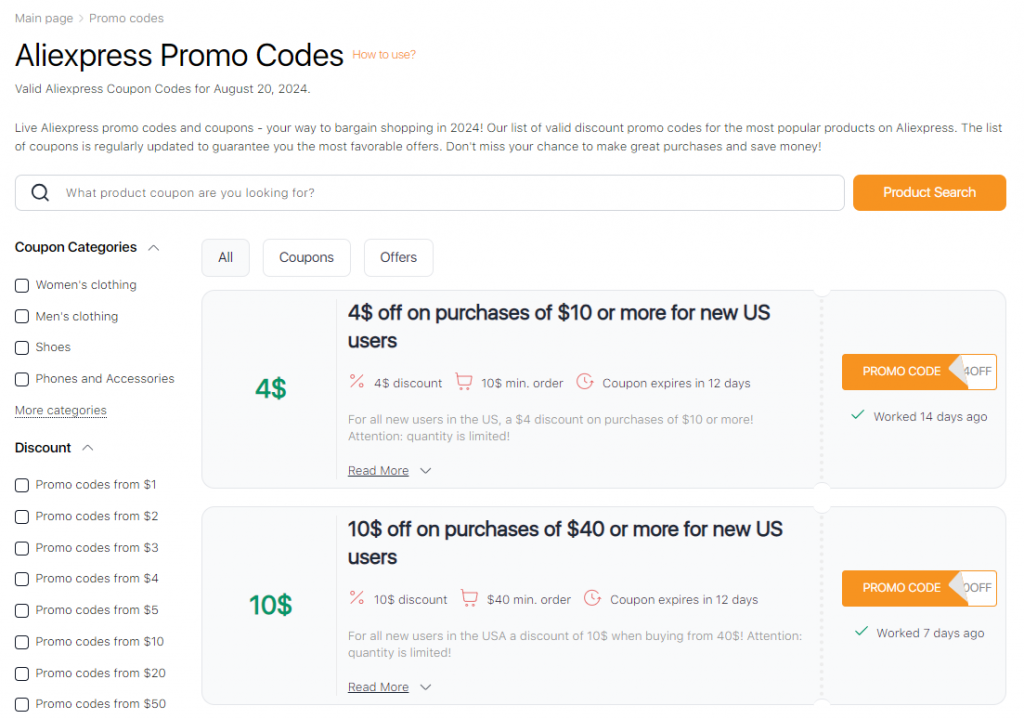
Promo codes can provide both stores and third-party services. For example, our website has a section with unique AliExpress promo codes. In it, you can conveniently filter the available coupons by different product categories, the amount of discounts and the total cost of your purchase. You can also search for specific merchants and specific products. To use a discount code on Aliexpress, click on the button opposite the desired offer, copy the code that appears and apply it at checkout. The coupon database is regularly updated to ensure that only current and valid discounts are available.
Coupons are now available in the AliHelper browser extension too! For example, let’s say you want to buy a power bank. Open the “Promo Codes” section and type the product name, e.g., “powerbank.” Choose an item you like – for instance, the UGREEN 20000 mAh for $77.49 – then copy the $5 promo code by clicking the orange label beneath it. Make sure to check the minimum order amount required for the discount (it appears when you hover over the promo code).
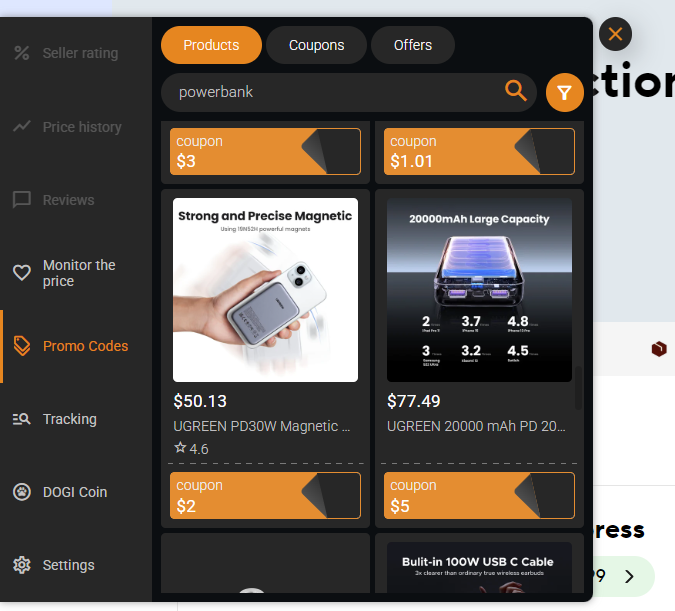
In this case, a product that originally cost $77.49 will cost $72.49, meaning you can buy it with a 6% discount!
Get Discounts for the First Order
AliExpress often offers special prices and coupons for new buyers. In most cases, these deals apply only to genuinely new accounts.
Get a Birthday Discount
If you add your date of birth to your AliExpress profile, the platform may offer birthday gifts or discounts. This feature is typically available in the mobile app.
Open Profile → Settings → Personal Information → Year of Birth, then enter your date.
Promotions to Get in the Mobile App
The mobile app often has extra promotions that don’t appear on the desktop site. You can find current offers in the “Promotions” section in the app.
Get a Personalized Store Discount
This method is simple but not guaranteed: add the item to your cart and message the seller. Some sellers offer a small discount (especially for multiple items), while others don’t.
How discounts stack
To maximize savings, always check the final checkout price.
Recommended order
- Choose the best base price (compare 2–3 sellers, options, bundles).
- Apply store coupons (seller coupons).
- Apply sale coupons (site-wide/event coupons, if available).
- Apply promo codes (event/category codes).
- Re-check shipping (sometimes savings move into shipping).
The 30-second verification rule
Before paying, verify:
- the same item from 2–3 sellers,
- the final price at checkout (not the badge),
- that the coupon actually applies to your cart.
10-minute prep checklist
If you want better prices today:
- Pick 5–10 items you actually plan to buy.
- Add them to your cart and Favorites.
- Save relevant store coupons and sale coupons.
- Compare 2–3 sellers for the same item (base price differs a lot).
- Verify price history for your top items (avoid fake discounts).
- Decide your target buy price (final checkout price).
- Buy on Day 1 if stock is limited; otherwise compare again on the final day.
How to ask for a discount from a seller on Aliexpress

- Message the seller via AliExpress chat (open the store page and click “Message”). Keep your tone polite and direct.
- Explain why you’re asking (bulk order, limited budget, choosing between similar listings).
- If you truly found a lower price elsewhere, mention it and share a link — but don’t pressure the seller.
- Ask for a reasonable discount. Very large requests are usually ignored.
- If you’ve bought from this seller before and had a good experience, say so.
- If the seller agrees, check out soon — it shows you’re serious.
Whether you get a discount depends on the seller’s policy and margins. A short, respectful message usually works best.
May be interesting: Search for products by photo on Aliexpress.
How to recognize fake discounts on Aliexpress
Fake discount red flags (quick table)
| Red flag | What it usually means | What to do |
|---|---|---|
| Big “–%” but final price barely changes | Inflated “before” price | Check price history and compare sellers |
| Cheap item + expensive shipping | Discount moved into shipping | Compare total checkout price (item + shipping) |
| Discount only on one color/bundle | Bait with a low-price variant | Switch options and re-check totals |
| Coupons exist but don’t apply | Restrictions (min spend/categories/new users) | Test coupons in cart before buying |
During big sales, some listings can look like “huge discounts” even when the final price isn’t actually better. One common trick is raising the “old” price shortly before the promotion so the discount percentage looks impressive.
To understand whether the seller provides a real or fake discount, you will have to resort to the help of a free third-party browser extension that has an “AliExpress price change history” feature — for example, AliHelper.
Let’s show a fake discount on the example of this children’s clothing.
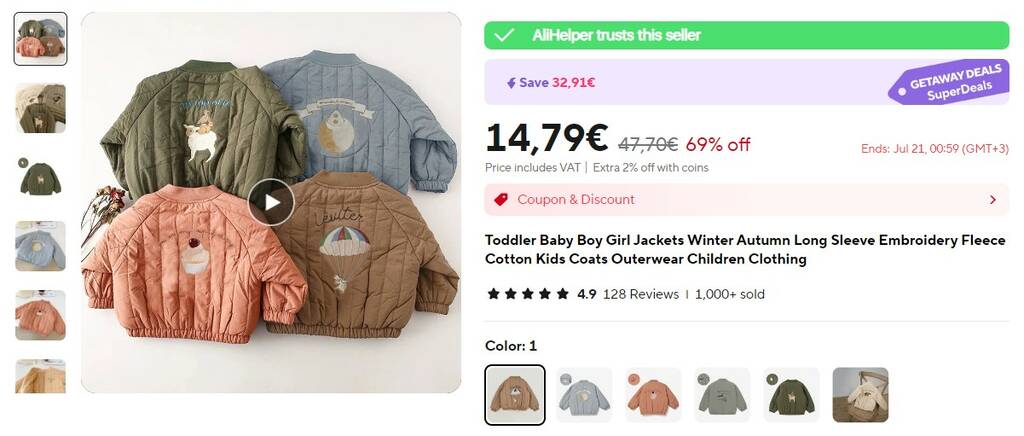
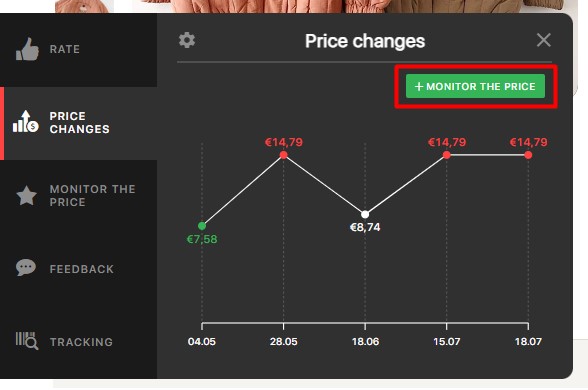
The seller states that the item is currently on sale at a 69% discount for 14.79 euros. And it was previously priced at €47.70. However, if you open the “Price Change” section, you can see that this garment did not cost more than 14.79 euros in the past. And just recently, its price went up by €6. That is, anyone who decides to buy this item now, thinking they are making a good deal – will overpay for it.
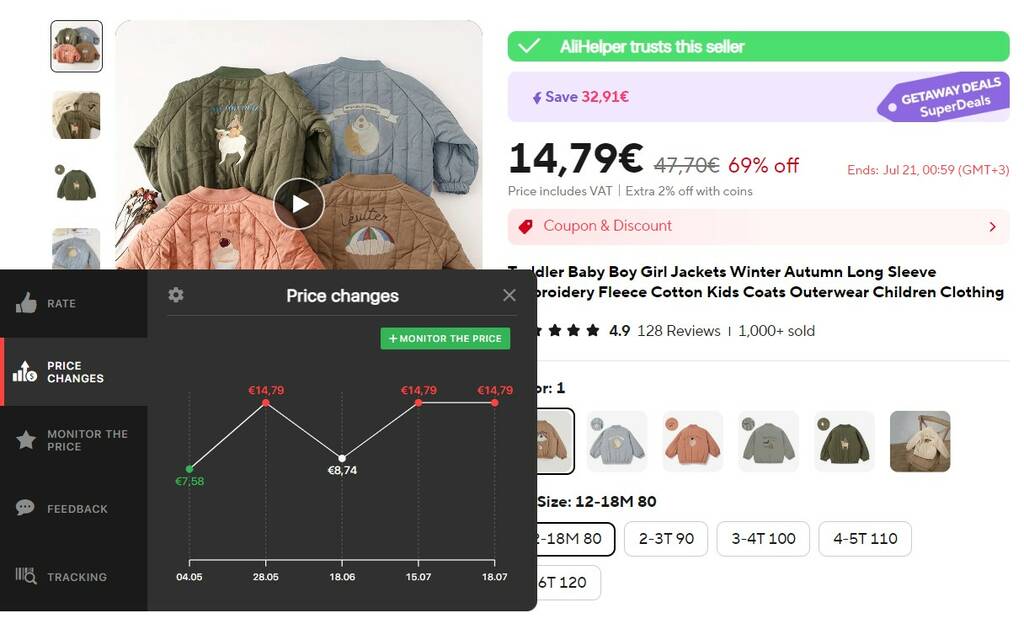
You don’t even need to open the full version of AliHelper to realize that the price reduction on the product you are viewing is fake.
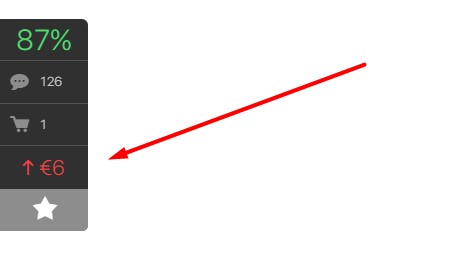
If the last price change was upward, there will be a difference written in red in the compact version of the extension.
However, if you want to buy a specific item from a specific seller and are willing to wait, you can sign up for a price drop notification. To do this, in the “Change the price” section, click on the “+ Monitor the price” button. When the price drops you will receive an e-mail or push notification, depending on your settings.
AliHelper will also help you track parcels, find similar products, check the seller for reliability by 5 objective criteria, etc.
Conclusion
To get the best price on AliExpress, combine a few simple steps: shop during major sales, check coupons and promo codes, and verify discounts using price history.
Now you know the main ways to get a discount on AliExpress in 2026.


Compare 2–3 sellers, apply coupons/promo codes, and verify the final checkout price.
Often yes, but rules depend on the event and the seller. Always test at checkout.
Use AliHelper price history and compare the final checkout price across sellers.