
 Install for free
How to delete Aliexpress account in 2026


Sometimes deleting an AliExpress account sounds like the cleanest solution: no more promo emails, no saved cards, no old orders, no temptation to buy another “very useful” kitchen gadget at 2 a.m.
But before you press the final button, it is worth checking what you may lose. Your order history, seller messages, coupons, bonuses and saved products are tied to your account. If you still have active orders, disputes or refunds, deleting the account too early can create unnecessary problems.
In this guide, I’ll show how to delete your AliExpress account on the website and in the mobile app, what to save before deletion and when a simpler option — such as disabling notifications or removing your card — may be enough.
Before you delete your AliExpress account (quick checklist)
- Make sure all active orders are completed (or disputes are resolved).
- Save anything you may need later: order details, receipts/screenshots, and links to favorite products/stores.
- Remove saved payment methods if privacy is your main concern.
- Consider alternatives first (log out, disable emails/notifications) if you only want fewer messages.
How to delete an Aliexpress account on the website
1. Go to aliexpress.com. This is the current version of the platform for buyers from all countries except CIS and Georgia;
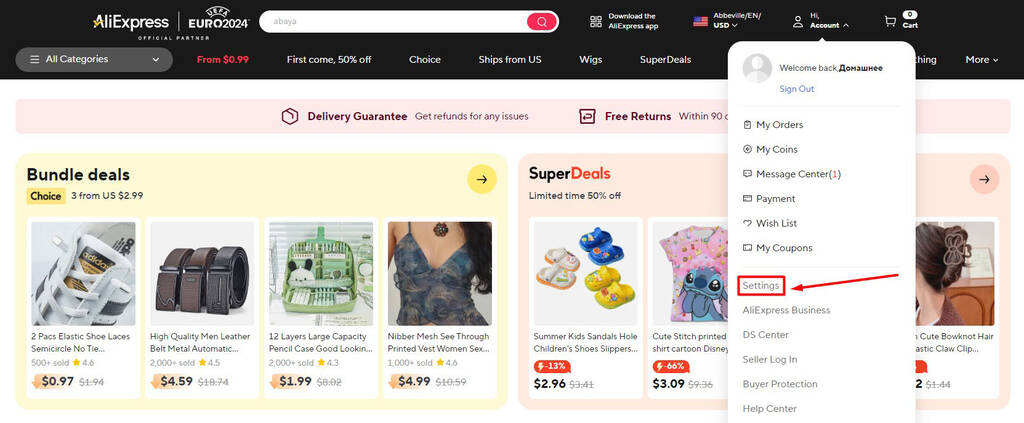
2. In your account settings, open the “Settings” section;
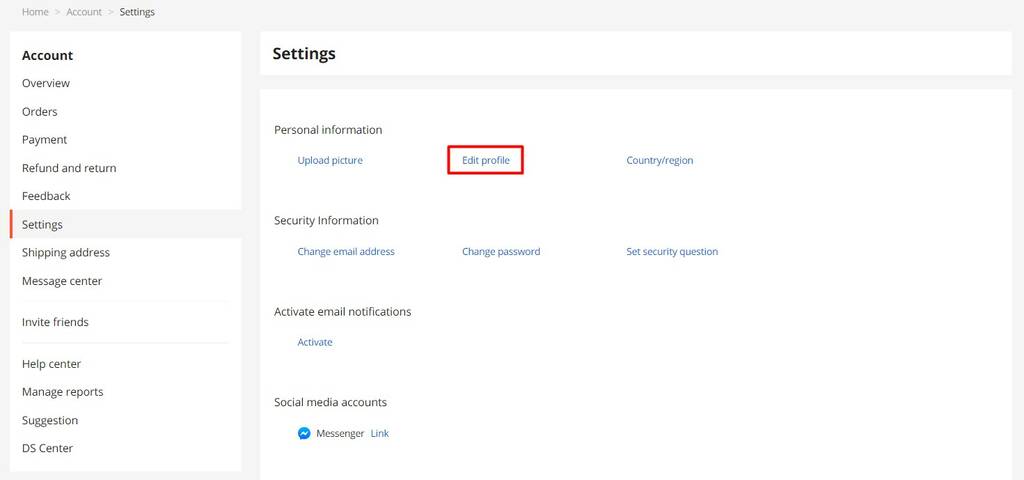
3. Click on “Edit profile” in the “Personal Information” subsection;
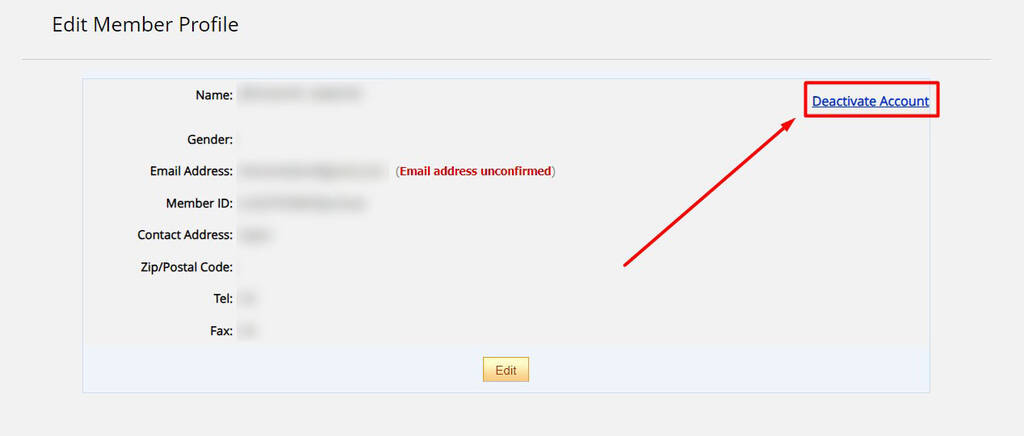
4. Next, click on the “Deactivate Account” link;
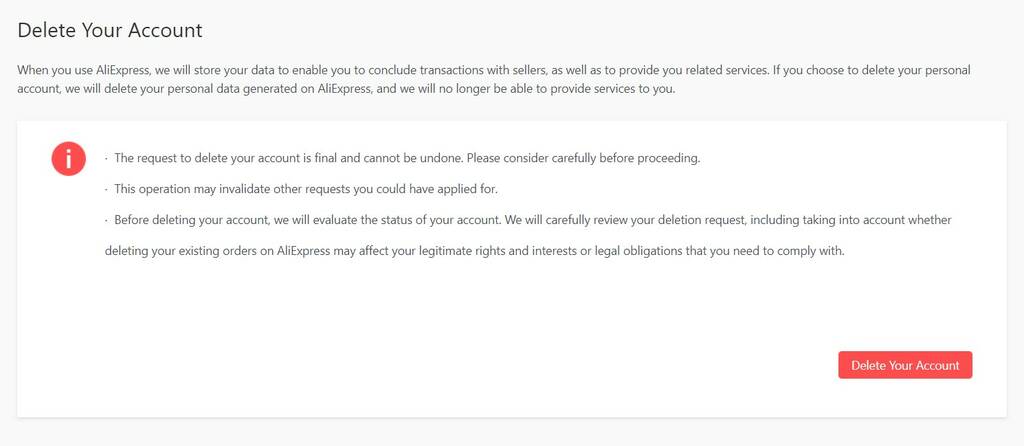
5. Click on the “Delete Your Account” button;
6. Type “agree” into the form and click on the Delete button;
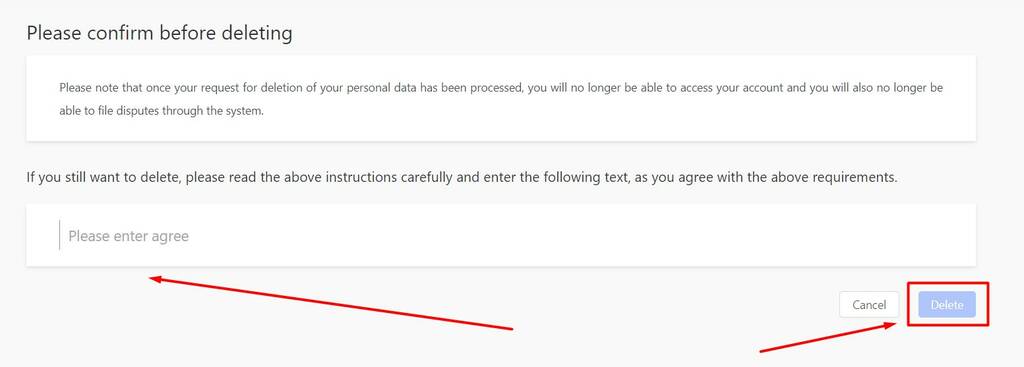
7. In the pop-up window, click on “Get Code” and navigate to your email inbox associated with your AliExpress profile. Look for an email titled “Your AliExpress Verification Code” and copy the provided code. Return to the verification pop-up and paste the code into the designated field, then click on “Verify.” Finally, click “Delete Account” to permanently remove your AliExpress account.
How to delete an account in the mobile app
How to delete an AliExpress account in the mobile app
The process in the AliExpress app is almost the same as on the website:
- Open the AliExpress app.
- Go to “Account”.
- Open “Settings”.
- Go to “Profile” or “Personal Information”.
- Choose “Deactivate Account” or “Delete Account”.
- Complete email verification.
- Confirm account deletion.
If you do not see the deletion option in the app, use the AliExpress website from a browser. It is often easier to find account settings there.
How to delete a blocked AliExpress account
If your AliExpress account is blocked, the standard deletion button may not be available. In this case, open the Help Center and check what options are available for your account. If you still have access to the registered email, save any order information you may need before contacting support.

Why people delete AliExpress accounts
People usually delete their AliExpress accounts for one of these reasons:
- too many emails and push notifications;
- privacy concerns;
- saved payment data;
- account security problems;
- loss of access to the registered email;
- bad experience with a seller or order;
- no plans to use AliExpress again;
- desire to clean up old online accounts.
But deletion is not always necessary. If the problem is spam, saved card data or notifications, there are easier ways to fix it.
What you lose after deleting your AliExpress account
Before deleting your account, check whether you still need anything from it. After deletion, you may lose access to:
- order history;
- tracking numbers;
- invoices, receipts and screenshots;
- disputes and refund history;
- messages with sellers;
- saved cards and addresses;
- favorite products and stores;
- coupons, bonuses and account level;
- reviews you left on products.
If you have ever won a dispute or spent half an evening proving that the “wool coat” was actually a thin synthetic napkin with sleeves, save the evidence before deleting the account.
Deactivate vs Delete: why AliExpress uses both words
AliExpress may show the button “Deactivate Account” during the account removal process. This does not always mean a soft pause or temporary break. In this flow, deactivation is usually the first step toward deleting the account.
The important part is the final confirmation screen. If you choose “Delete Your Account”, type “agree”, enter the email verification code and confirm deletion, your account removal request is completed.
Simple rule:
- “Deactivate Account” = the entry point into the removal flow.
- “Delete Account” = the final step.
Alternatives to deactivating an Aliexpress account
Deleting the mobile application
If for some reason you do not want to use the AliExpress platform exactly from your phone, you can easily delete the application. To do this, just find it on the screen of your smartphone, press and hold the application icon until the menu appears. Then select the “Uninstall” option. After that, the app will be completely removed from your device. And you will no longer receive notifications and messages from AliExpress on your phone;
Disable notifications and emails
If you are tired of numerous unnecessary notifications and emails from AliExpress, you can easily disable them in your account settings on the website or in the app. To do this, go to the notification settings and uncheck the notification types you don’t need. You can also unsubscribe from newsletters directly in your inbox using the unsubscribe links that are usually found at the bottom of each email. This will ensure that you only receive the information that really matters;
Signing out of your Aliexpress account
If you simply do not want to stay logged in on a shared device, you can log out of your account in your personal account settings. After that, your account will be deactivated on your device. And you will need to enter your login and password the next time you log in. In addition, it is recommended to clear your browser history and delete saved passwords. If you want more privacy, you can also clear saved passwords and browsing data on your device.
Deleting card data
If you are worried about the privacy of your payment information, do not save your card details when making a payment. And if you have already saved it, you can easily delete it. This will keep your financial information safe and prevent its possible misuse. Read: How to remove card from Aliexpress.
Contacting other stores on the platform
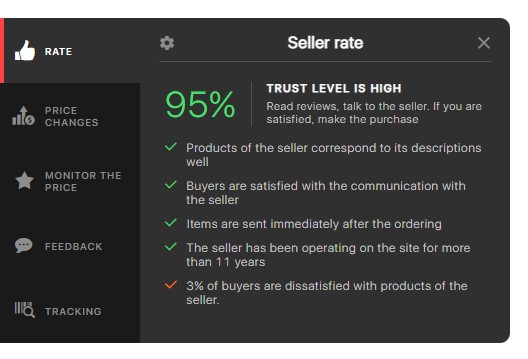
Aliexpress is a marketplace, i.e. a platform where thousands of individual organizations provide goods. If you encounter rudeness or fraud from a particular seller, try contacting another. There are a lot more decent stores on the platform. And finding a reliable seller on Aliexpress will help AliHelper. It will show a detailed rating of each store according to five criteria.
Additional security measures
In addition to the above measures, you may want to consider other ways to protect your information on AliExpress. For example, change your passwords periodically and use two-factor authentication to increase security. Also, keep an eye out for suspicious activity on your account and respond promptly to any notifications of suspicious activity.
Conclusion
The process of deleting an account on AliExpress is quite simple, but it leads to irreversible consequences. Before deciding to deactivate your account, it’s important to weigh the pros and cons. You may be able to find an alternative solution to avoid account deletion. For example, you can simply turn off notifications or temporarily suspend your use of the platform.
If you do decide to delete your account, be sure to keep the links to your favorite products and stores. So that you can easily find them again if needed. This is especially important if you have favorite products or stores that you return to often.
Now you know how to delete your AliExpress account permanently both on your computer and through the mobile app in 2026. The process involves a few simple steps that will help you permanently deactivate your profile. Don’t forget that once your account is deleted, all your data, purchase history and saved items will be lost forever and it will be impossible to recover them.


Open your AliExpress account settings, go to your profile or personal information section, choose “Deactivate Account” or “Delete Account”, type “agree” if required, verify the action by email code and confirm deletion.
Yes, the app usually has a similar account deletion flow. Open Account → Settings → Profile or Personal Information, then look for Deactivate/Delete Account. If you cannot find the option, use the AliExpress website.
Yes, account deletion should be treated as permanent. You may be able to create a new account later, but your old order history, messages, coupons and saved items may not return.
Complete active orders, resolve disputes, save receipts and screenshots, copy tracking numbers, save links to favorite products or stores and remove saved payment methods if privacy is your main concern.
It is better to wait until all orders are completed and all disputes or refunds are resolved. Deleting the account too early can make it harder to access order details later.
In the AliExpress removal flow, “Deactivate Account” may be the first step. “Delete Account” is the final action that confirms account removal.
You should not rely on recovery. If you delete the account, treat order history, messages, coupons and saved data as lost.
Unsubscribe from newsletters in your email inbox or turn off marketing notifications in AliExpress account settings.
Yes. If your main concern is payment privacy, removing saved card data may be enough.
No. AliHelper cannot delete your AliExpress account. But it can help you avoid bad shopping experiences by checking seller reliability, price history, similar products, coupons and parcel tracking.