
 Install for free
How to Change Currency on AliExpress: Website, App and Checkout Tips


AliExpress shows prices in different currencies depending on your region, account settings, language, shipping country and sometimes your browser or app settings. If the prices are shown in the wrong currency, you can usually change them manually on the website or in the mobile app.
However, changing the display currency does not always mean that your bank will charge you in exactly the same currency. The final amount may still depend on AliExpress checkout rules, your payment method, your bank’s exchange rate and possible foreign transaction fees.
In this guide, you will learn how to change currency on AliExpress, how to do it on the website and in the app, why prices may look different at checkout and what to do if AliExpress keeps switching back to another currency.
Quick answer
To change currency on AliExpress, open the website or app, go to the region/language/currency settings and choose the currency you want to see. On the website, this option is usually available near the top of the page next to the country, language or flag icon. In the mobile app, open account settings and look for country/region, language or currency settings.
Remember: changing the display currency helps you understand prices more easily, but the final amount charged by your bank may still depend on your payment method, exchange rate and bank fees.
Could be interesting: How to register on AliExpress.
Why change currency on AliExpress?
Changing the display currency on AliExpress can make shopping easier, especially if you do not want to convert prices manually.
It can help you:
- understand product prices faster;
- compare similar products more easily;
- estimate your budget before checkout;
- see discounts in a familiar currency;
- avoid mistakes when comparing several sellers;
- understand whether shipping changes the final price.
However, the displayed currency is not always the same as the final billing currency. Your bank, card provider or payment service may still apply its own exchange rate or foreign transaction fee. Always check the final checkout amount before paying.
If you want to choose a different payment method, read more about how to do it and the available options in our article: Aliexpress payment methods.
Display currency vs payment currency
Changing currency on AliExpress usually changes how prices are displayed on product pages, search results and the cart. But this does not always guarantee that your card or bank will process the payment in the same currency.
| Term | What it means |
|---|---|
| Display currency | The currency you see on AliExpress product pages and in search results |
| Checkout currency | The currency shown when you place the order |
| Billing currency | The currency charged to your card, wallet or payment method |
| Bank conversion | The exchange rate and fees applied by your bank or card provider |
Before paying, always check the final checkout page. This is the most important price, not only the product page price.
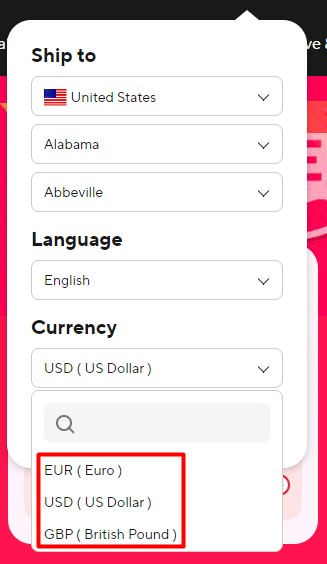
How to change currency on the Aliexpress website
1. Go to aliexpress.com;
2. Click on the flag sign at the top of the page;

3. Select the desired currency in the appropriate section (dollar, euro, etc).
How to change currency on AliExpress in the mobile app
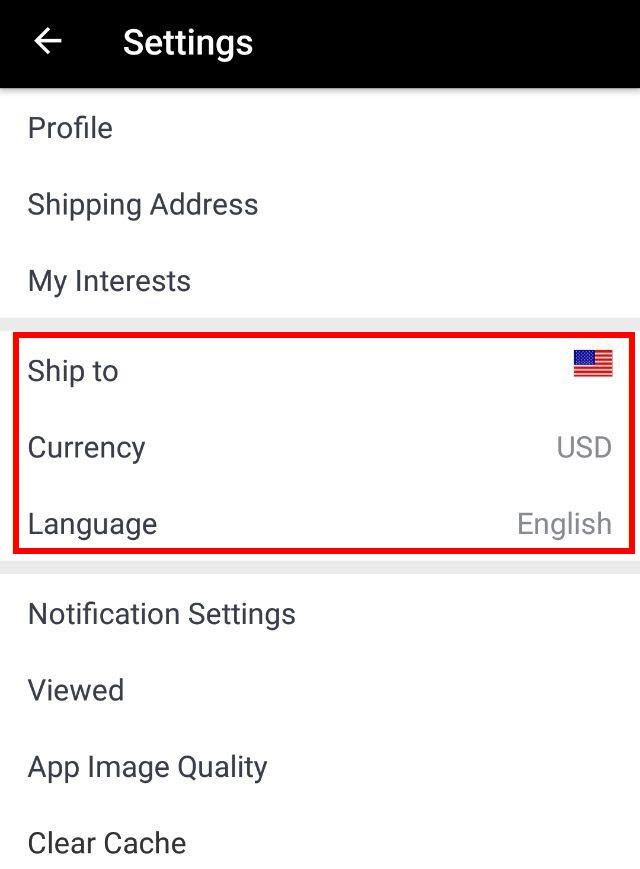
Users of the mobile application can also change the currency. To do this, you must first download the application from the official resource. Owners of Android devices can find the application on Google Play, and Apple users – in the App Store.
You can change the currency in the “Settings” section.
Why does AliExpress show the wrong currency?
AliExpress may show the wrong currency for several reasons:
- your region was detected automatically;
- your shipping country changed;
- your browser saved old settings;
- you are not logged in;
- the app and website use different settings;
- cookies or cache restored previous preferences;
- your VPN changed your detected location;
- AliExpress changed the currency based on your delivery address;
- the selected currency is not available for your region or payment method.
If the currency keeps changing back, check both website and app settings, log in to your account and clear cookies or app cache.
Currency problems on AliExpress: quick fixes
| Problem | Possible reason | What to do |
|---|---|---|
| Currency keeps changing back | Region, cookies or app settings override it | Log in, change settings again and clear cache |
| Website shows one currency, app shows another | Settings are not synced | Change currency in both website and app |
| Checkout shows a different amount | Shipping, tax, coupon or conversion changed the final price | Check the final checkout page carefully |
| Currency option is missing | App version or regional limitation | Update the app or try the website |
| Prices look higher after changing currency | Exchange rate, taxes or rounding | Compare final price, not only product page price |
| Bank charged a different amount | Bank conversion or foreign transaction fee | Check your bank statement and card terms |
Does changing currency change AliExpress prices?
Changing currency usually changes how the price is displayed. It does not necessarily make the product cheaper.
The final price may still depend on:
- product price;
- shipping cost;
- coupons;
- taxes or VAT;
- seller discounts;
- exchange rate;
- payment method;
- bank fees;
- rounding differences.
If you want to compare prices accurately, check the final checkout amount with shipping and discounts included.
Which currency should you choose on AliExpress?
In most cases, choose the currency that helps you understand the final cost best.
You may choose your local currency if:
- you want easier budgeting;
- you do not want to convert prices manually;
- you compare AliExpress prices with local stores;
- your payment method works well in your local currency.
You may choose USD or EUR if:
- your card has better exchange rates for that currency;
- your bank account is in USD or EUR;
- you compare prices across international stores;
- AliExpress shows more stable prices in that currency.
The best option depends on your bank, card, country and payment method. Check the final amount before paying.
Conclusion
Changing the currency on AliExpress (to dollars, euros or another currency) is a straightforward yet powerful tool to enhance the convenience and cost-effectiveness of your shopping experience. By selecting your preferred currency, you can avoid the often cumbersome and potentially costly currency conversion fees charged by banks or payment gateways. This adjustment not only simplifies the budgeting process by allowing you to see prices in your local or preferred currency, but it also accelerates the shopping process by eliminating the need to convert prices manually.
Understanding how to change the currency on AliExpress opens up a more tailored and efficient shopping journey. Once you set your currency preference, all product prices and transactional amounts will automatically reflect in the new currency, making it easier to track how much you’re spending in real terms. Additionally, this can help in comparing prices more effectively when you’re looking at similar products across different sellers or when monitoring price changes over time.
Now that you know how to switch currencies on AliExpress, you are well-equipped to make the most out of this feature, which will undoubtedly make your shopping more straightforward, enjoyable, and more convenient and easier to control. By streamlining this aspect of the shopping experience, you can focus more on finding the best deals and products suited to your needs.


Open AliExpress, go to the country, language or currency selector and choose the currency you want to use. On the mobile app, open account settings and look for country/region, language or currency settings.
Yes. Open the AliExpress app, go to Account or My Account, open Settings and look for currency, country/region or language settings. If prices do not update, restart the app.
AliExpress may choose currency automatically based on your region, shipping country, app settings, browser cookies or account preferences. VPNs and cached settings can also affect the displayed currency.
This may happen because your region, shipping address, cookies or app settings override your selected currency. Log in to your account, change currency again and clear browser cookies or app cache if needed.
Usually, no. Changing currency mainly changes how prices are displayed. The final price still depends on product cost, shipping, taxes, coupons, exchange rate and payment method.
Not always. Your bank or payment provider may process the payment in another currency and apply its own exchange rate or foreign transaction fee.
The checkout price may include shipping, VAT, taxes, coupons, seller discounts, product options and currency conversion. Always check the final amount before paying.
Usually, the best currency is the one that helps you understand the final cost clearly. For many users, this is their local currency. Some buyers prefer USD or EUR if their bank offers better exchange rates.
In some cases, yes. The currency shown on AliExpress may be different from the currency your bank uses for billing. Always check the checkout page and your card terms.