
 Install for free
AliExpress Order History: How to View, Delete and Restore Old Orders


AliExpress order history is the place where all your past purchases live: orders, tracking numbers, seller names, product links, delivery details, reviews, refunds and disputes.
It becomes especially useful when you want to buy the same item again, find a seller you already trust, check how much you paid before, download order details, track an old parcel or prove something in a dispute.
In this guide, I’ll show where to find your AliExpress order history on the website and in the mobile app, how to remove old orders from the main list, how to restore deleted orders and what to do if your order history suddenly looks empty.
It could be interesting: How to track AliExpress shipping.
What information is stored in AliExpress order history?
AliExpress order history can help you find:
- product name and product link;
- seller or store name;
- order number;
- order date;
- payment amount;
- shipping address;
- tracking number;
- delivery status;
- refund or dispute status;
- messages connected with the order;
- feedback/review option;
- option to buy again or find similar products.
This is why I do not recommend deleting old orders too quickly. Sometimes the order you want to remove today becomes the only proof you need tomorrow.
How to view the history of orders on the site Aliexpress
1. To view your order history, first log in to your AliExpress account;
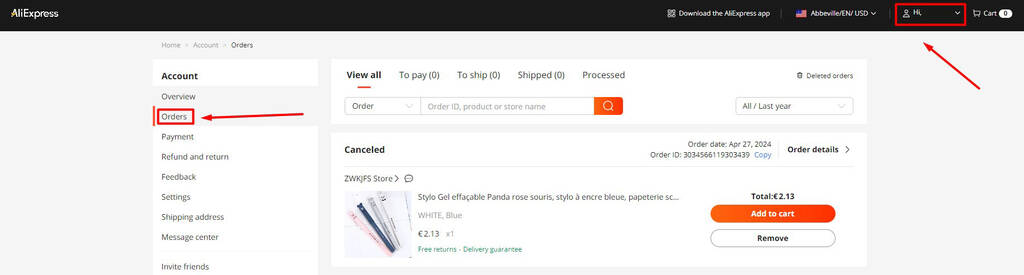
2. Go to “Orders” to list your purchases;
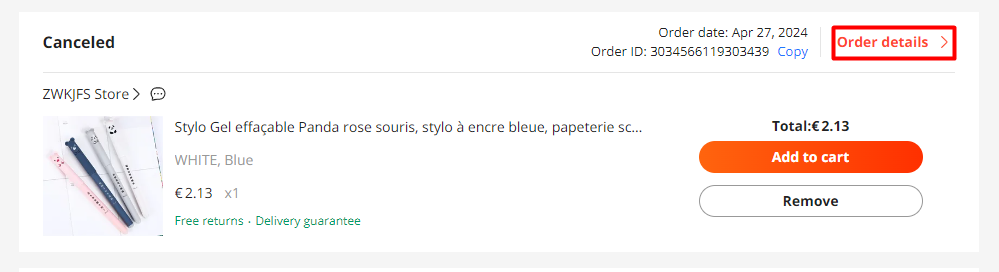
3. Click “Order Details” to view information about a specific order, including shipping information, the ability to leave feedback, etc.
Where to find your purchase history in the mobile app
In the AliExpress app, order history works almost the same way as on the website.
How to clear old orders on Aliexpress
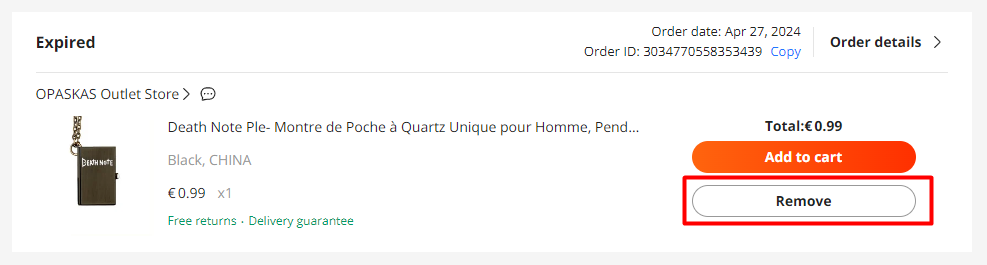
To remove an order from the main list, tap “Remove” next to the desired purchase.
Can I restore my purchase history?
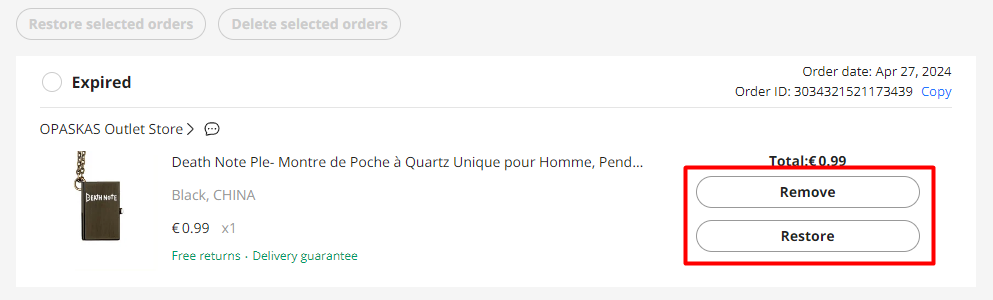
In the subsection “Deleted orders” you will find orders that have been deleted from the main list.

If you want to restore the order, click “Restore”, and to remove it permanently, click “Remove”.
If you cannot buy the same product from the same seller from an already verified seller, AliHelper can help you check the seller’s rating, compare similar products and decide whether another store is worth buying from.
Why your AliExpress order history is useful
Order history helps when you want to:
- reorder the same product;
- find a trusted seller again;
- compare old and current prices;
- check whether a product became more expensive;
- track a parcel;
- open or support a dispute;
- confirm what you actually ordered;
- prove that the seller sent the wrong item;
- leave a review;
- check refunds;
- control your shopping expenses;
- notice suspicious or unauthorized orders.
For frequent AliExpress shoppers, order history is not just “past purchases”. It is your evidence folder, shopping diary and seller archive in one place.
Why did my AliExpress order history disappear?
If your order history is empty, it does not always mean that AliExpress deleted your orders.
Common reasons:
| Reason | What to check |
|---|---|
| You logged into another account | Try email, phone, Google, Facebook, Apple or another login method |
| You changed region/app/account method | Check the website and app separately |
| Orders were removed from the main list | Open “Deleted Orders” |
| Orders are archived or filtered | Clear filters and check all order statuses |
| You are using the wrong email | Search your inbox for old AliExpress order confirmations |
| Temporary app glitch | Try browser, app update or another device |
| Account was deleted or blocked | Contact AliExpress support |
The most common human mistake is simple: you think you restored the old account, but actually logged into a new empty one. AliExpress will not put a sign on the door saying “wrong digital apartment”.
How to find a specific old AliExpress order
If you remember the product but cannot find the order:
- Clear order filters.
- Check completed orders.
- Check archived or deleted orders.
- Search your email for the product name.
- Search your email for “AliExpress order”.
- Look for order confirmation emails.
- Check payment history in your bank or wallet.
- Search by seller name if you remember it.
- Try the AliExpress website if the app search is inconvenient.
If you only need to buy the same item again, old order history is usually faster than AliExpress search. Search may show you 500 similar products. Order history shows the one you actually bought.
Order history on Aliexpress is not only a way to remember what you bought, but also a tool to effectively manage your online purchases. By keeping track of your order history, you can easily reference past purchases, making it simpler to reorder items or resolve any issues that may arise with a particular order. This can be particularly useful for frequent shoppers who need to keep tabs on their spending and product preferences.
Additionally, your order history can help you identify trends in your shopping habits, such as the types of products you buy most often or the times of year when you tend to make more purchases.
Remember that your data is your responsibility, so treat the information in your personal account with care. Regularly reviewing your order history can also help you spot any unauthorized purchases or discrepancies, ensuring your account security. If you notice any unusual activity, you can quickly take action by contacting Aliexpress customer service.


Open your AliExpress account and go to “Orders” or “My Orders”. On the website, this section is available from your account menu. In the app, open “Account” and then “Orders”.
Open “My Orders”, clear filters and check completed, archived or deleted orders. If you still cannot find the order, search your email for AliExpress order confirmations.
You can remove individual orders from the main order list. Removed orders may appear in “Deleted Orders”, where you can restore them or remove them permanently.
Yes, if the order is still in the “Deleted Orders” section. Open deleted orders and click “Restore”.
You may have logged into a different account, used another login method, filtered orders, removed them from the main list or opened the wrong app/account version.
Try other login methods: email, phone, Google, Facebook or Apple. Search your email for old AliExpress order confirmations and check which account received them.
Yes. Open the old order and click the store or product link. This is often the fastest way to find a seller you bought from before.
Yes, if the product or store is still available. Before reordering, check recent reviews, seller rating, price history and delivery terms.